Hey, guys. Recently unlocked turbobust on Windows 10, asus z10pe d16ws motherboard, two 2696 V3 processors. Now I need to unlock the turbo boost for the Ubuntu 18.04 lts system. How do I do this ? I am particularly interested in how to upload the processor microcode to Ubuntu? Tell me please.

-
We’re currently investigating an issue related to the forum theme and styling that is impacting page layout and visual formatting. The problem has been identified, and we are actively working on a resolution. There is no impact to user data or functionality, this is strictly a front-end display issue. We’ll post an update once the fix has been deployed. Thanks for your patience while we get this sorted.
You are using an out of date browser. It may not display this or other websites correctly.
You should upgrade or use an alternative browser.
You should upgrade or use an alternative browser.
What controls Turbo Core in Xeons?
Page 120 - Seeking answers? Join the AnandTech community: where nearly half-a-million members share solutions and discuss the latest tech.
Djordjemasinac
Junior Member
@MOF Hello MOF, could you please compile your 50_50_50 EFI with fixed voltage? My cpu is jumping between 1200 and 3300 and i am afraid at 1200 there might not be enough voltage with -50 wheareas it's enough at 3300. Also because i use the Huanan motherboard, i need vr efficiency mode on.
Thanks a lot!
Thanks a lot!
phyrexiancure
Junior Member
Is there a guide to apply the turbo mod to an MSI x99 motherboard, specifically a x99A SLI Plus with and AMI UEFI bios. I found a guide on this thread for other motherboards brands but MSI was left out. Also hey, first time in this forum.
phyrexiancure
Junior Member
I'm assuming the only way to mod the bios for MSI x99 boards is pretty elaborate because of the AMI Aptio V bios. I've found a discussion about modding MSI boards in this thread and but I haven't read through all they links they provided. Just to confirm does the MSI board that I have use the AMI Aptio V bios and does this bios require manually hacking the bios thats pretty elaborate?
Kaigloeckner
Junior Member
Hello, could you please make more options between -90 mv and -150 mv. I tried to do it myself, but i cant get it. My processor 2640v3 can work with lower voltage than -90 mv. Thank you.
- V3_MOF_505050.efi
- V3_MOF_505050.ffs
- V3_MOF_605050.efi
- V3_MOF_605050.ffs
- V3_MOF_705050.efi
- V3_MOF_705050.ffs
- V3_MOF_805050.efi
- V3_MOF_805050.ffs
- V3_MOF_905050.efi
- V3_MOF_905050.ffs
If you want you can load these efi drivers directly from the efi shell for testing.
use "load" command
load fs5:\V3_MOF_505050.efi (loads efi driver)
fs1:\EFI\Boot\bootx64 (loads windows)
something like this, you get it. 🙂
https://drive.google.com/file/d/1aBzuUedZkrQKlrnLHVekXhSEGfAx1Rb3/view?usp=sharing
phyrexiancure
Junior Member
The V3 with turbo are much faster. I believe V4's are about 5% faster than V3's at the same clock but V3's are about 20-30% faster with the turbo mod and higher potential BCLK overclock.What's going to give better overall performance a V4 or a V3 with the same core count but the V3 with the turbo mod?
xj6series1
Junior Member
Any chance someone could upload a modded BIOS for a Z10PE-D8? Much appreciated.
Any chance someone could upload a modded BIOS for a Z10PE-D8? Much appreciated.
There are a few posted in this thread. I think this was the latest one: https://we.tl/t-I2J2mYbF4V
xj6series1
Junior Member
There are a few posted in this thread. I think this was the latest one: https://we.tl/t-I2J2mYbF4V
Yes, but all expired unfortunately.
Yes, but all expired unfortunately.
This one still works: http://www.kristech.net/haswell/mod_Z10PE-D8-WS-ASUS-3407.zip
phyrexiancure
Junior Member
Does any one have the a turbo modded BIOS for the MSI x99A SLI Plus?

MOF
Member
(Modified versions of v3x2_50_vcc.efi)
1.7V vccin
v3x2_20-50-50_vcc.efi
v3x2_30-50-50_vcc.efi
v3x2_40-50-50_vcc.efi
v3x2_60-50-50_vcc.efi
v3x2_70-50-50_vcc.efi
v3x2_80-30-50_vcc.efi
v3x2_80-50-50_vcc.efi
v3x2_90-50-50_vcc.efi
1.8V vccin
v3x2_20-50-50_vcc1.8.efi
v3x2_30-50-50_vcc1.8.efi
v3x2_40-50-50_vcc1.8.efi
v3x2_60-50-50_vcc1.8.efi
v3x2_70-50-50_vcc1.8.efi
v3x2_80-50-50_vcc1.8.efi
v3x2_90-50-50_vcc1.8.efi
(Modified versions of v3x2_50_39_vcc.efi, ucode 39 included)
1.7V vccin
v3x2_39_vcc.efi
v3x2_20-50-50_39_vcc.efi
v3x2_30-50-50_39_vcc.efi
v3x2_40-50-50_39_vcc.efi
v3x2_60-50-50_39_vcc.efi
v3x2_70-50-50_39_vcc.efi
v3x2_80-30-50_39_vcc.efi
v3x2_80-50-50_39_vcc.efi
v3x2_90-50-50_39_vcc.efi
1.8V vccin
v3x2_20-50-50_39_vcc1.8.efi
v3x2_30-50-50_39_vcc1.8.efi
v3x2_40-50-50_39_vcc1.8.efi
v3x2_60-50-50_39_vcc1.8.efi
-80mV vcore, -50mV cache, -50mV system agent, 1.8V vccin, Powercut + ucode39
v3x2_80-50-50_39_vcc1.8.efi
-90mV vcore, -50mV cache, -50mV system agent, 1.8V vccin, Powercut + ucode39
v3x2_90-50-50_39_vcc1.8.efi
-90mV vcore, -60mV cache, -50mV system agent, 1.8V vccin, Powercut + ucode39
v3x2_90-60-50_39_vcc1.8.efi
My domain is expired but you can still get those file, just replace "masterofphoton.com" to "https://s3.eu-central-1.amazonaws.com/masterofphoton.com"Can you share all the files again? The previous link has expired
like that

Hi Guys and Gals.
New here, and i'm a little bit stuck.
Is there a clear walk through for an Asrock X99 Extreme 4?
Or can anyone provide the modded bios?
Been trying my luck to remove the microcodes but really not working out for me.
This is the screen I get after loading in the Bios from Asrock website and cannot work out how to remove the microcode...
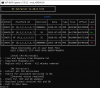
Thanks.
New here, and i'm a little bit stuck.
Is there a clear walk through for an Asrock X99 Extreme 4?
Or can anyone provide the modded bios?
Been trying my luck to remove the microcodes but really not working out for me.
This is the screen I get after loading in the Bios from Asrock website and cannot work out how to remove the microcode...
Thanks.
Last edited:
Hi Guys and Gals.
New here, and i'm a little bit stuck.
Is there a clear walk through for an Asrock X99 Extreme 4?
Or can anyone provide the modded bios?
Been trying my luck to remove the microcodes but really not working out for me.
This is the screen I get after loading in the Bios from Asrock website and cannot work out how to remove the microcode...
View attachment 17878
Thanks.
Press 'V'
Delete the 306F2 line from the MCUpdate.txt (or comment it out with '#')
Press 'F'.
Press 'V'
Delete the 306F2 line from the MCUpdate.txt (or comment it out with '#')
Press 'F'.
Still having trouble after this sadly...
Stick the .bin file it makes on a USB, and then try and load it in the Bios with InstantFlash.... doesn't recognise the file?
Sorry i seem more illiterate at this than i first suspected.
Your help is much appreciated.
Still having trouble after this sadly...
Stick the .bin file it makes on a USB, and then try and load it in the Bios with InstantFlash.... doesn't recognise the file?
Sorry i seem more illiterate at this than i first suspected.
Your help is much appreciated.
Try to use AFU or FPT. There are many tutorials. But it's not 100% that they will work.
The best method is using an external programmer like TL866 or CH341. Clamps do not work for me, I always solder out the eeprom. It's not that hard.
Ok so flashing the Bios IC directly works.
I can run EFI.v3 and I can then log into Windows and confirm all core turbo works (+~20% gains in XTU)... However, I can't copy the EFI file to the boot drive.
MSINFO32 tells me Windows is running in Legacy mode.... but i'm running on an NVME PCIEx4 SSD... which requires UEFI.... Odd....
Going to reinstall windows and see if that resolves it?
Not sure how to force it to install in UEFI mode?
I can run EFI.v3 and I can then log into Windows and confirm all core turbo works (+~20% gains in XTU)... However, I can't copy the EFI file to the boot drive.
MSINFO32 tells me Windows is running in Legacy mode.... but i'm running on an NVME PCIEx4 SSD... which requires UEFI.... Odd....
Going to reinstall windows and see if that resolves it?
Not sure how to force it to install in UEFI mode?
TRENDING THREADS
-
 Discussion Zen 5 Speculation (EPYC Turin and Strix Point/Granite Ridge - Ryzen 9000)
- Started by DisEnchantment
- Replies: 25K
-
Discussion Intel Meteor, Arrow, Lunar & Panther Lakes + WCL Discussion Threads
- Started by Tigerick
- Replies: 25K
-
 Discussion Intel current and future Lakes & Rapids thread
- Started by TheF34RChannel
- Replies: 24K
-

-
