

-
We’re currently investigating an issue related to the forum theme and styling that is impacting page layout and visual formatting. The problem has been identified, and we are actively working on a resolution. There is no impact to user data or functionality, this is strictly a front-end display issue. We’ll post an update once the fix has been deployed. Thanks for your patience while we get this sorted.
You are using an out of date browser. It may not display this or other websites correctly.
You should upgrade or use an alternative browser.
You should upgrade or use an alternative browser.
Modern home materials & technologies discussion thread
Page 18 - Seeking answers? Join the AnandTech community: where nearly half-a-million members share solutions and discuss the latest tech.
Just put up Govee permanent outdoor lights, these things are great.
If you put up holiday lights, take the time to check them out.
 us.govee.com
If you put up holiday lights, take the time to check them out.
Govee - Making Life Smarter | LED Lights & Appliances
Govee leads with next-gen RGBIC tech, delivering smart LED strip lights, outdoor lights, floor lamps, TV backlight, smart appliances, and more for your ...
us.govee.com
Kaido
Elite Member & Kitchen Overlord
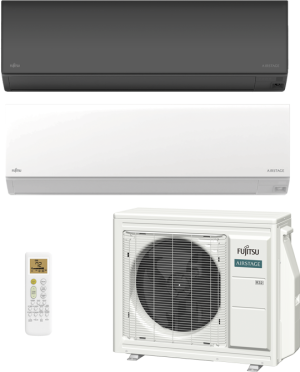
Fujitsu Introduces AIRSTAGE Orion XLTH+ Cold Climate Heat Pump:
Product page:
Airstage wireless smartphone control:
Home Assistant integration: (DIY smarthome)

 github.com
Product page:
Fujitsu General America has introduced the single-zone, wall-mounted AIRSTAGE Orion XLTH+, the newest addition to its H-Series R-32 heat pump line.
The Orion XLTH+ (Extra Low Temperature Heating Plus) system is a cold-climate mini-split system designed to deliver exceptional heating performance in extremely low outdoor ambient conditions. This premium system ensures indoor comfort even at outdoor temperatures as low as -22°F (-30°C) while maintaining high efficiency with a SEER2 rating of up to 33.5 SEER2. AIRSTAGE Orion XLTH+ offers superior heating performance, maintaining full rated (100%) capacity at -15°F (-26°C) and 90% rated capacity at -22°F (-30°C).
Its compact outdoor unit, slim wall-mounted indoor unit, and extended line set lengths (up to 66 feet) simplify installation in almost any space. Both the indoor and outdoor units are extremely quiet, with sound levels as low as 23 dB (A) indoors and 44dB (A) outdoors.
Orion XLTH+ is available in three capacities: 9,000, 12,000 and 15,000 BTUh, with maximum heating capacities of 24,000, 27,300 and 28,000 BTUh, respectively. The indoor unit features ProCore™ (high corrosion resistant copper) coils for long lasting protection. In addition to an inverter-driven compressor, the compact outdoor unit includes a base pan heater for optimal winter performance.
System control options are nearly endless, including built-in WiFi connectivity with remote monitoring via the AIRSTAGE Mobile App, a backlit wireless remote, compatibility with a variety of Fujitsu wired controls, and third-party interface options, including BACnet and Modbus for integration with building and home automation systems.
Many optional accessories are available, including Fujitsu’s wired remote controllers, wireless controllers, Building Management System (BMS) adapters, hail guards, snow hoods, wind baffles, and more.
For more information, please visit www.FujitsuGeneral.com
Airstage wireless smartphone control:
Home Assistant integration: (DIY smarthome)
GitHub - danielkaldheim/ha_airstage: Connects your Fujitsu Airstage air conditioner to Home Assistant.
Connects your Fujitsu Airstage air conditioner to Home Assistant. - danielkaldheim/ha_airstage
github.com
Kaido
Elite Member & Kitchen Overlord
Samsung 5.3cf vented AIO washer/dryer: (68-minute cycle)

 www.samsung.com
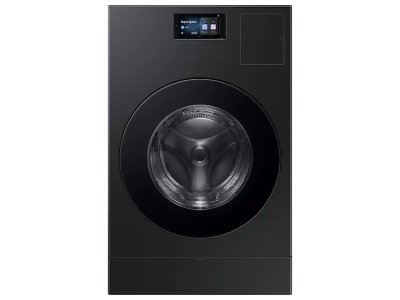
Bespoke AI Vented Laundry Combo™ All-in-One Washer Dryer in Brushed Black | Samsung US
Shop the Bespoke AI Vented Laundry Combo™, All-in-One Washer Dryer in Brushed Black with Super Speed wash, extra large capacity, & vented electric dryer.
www.samsung.com
I'm planning to put them on my house next spring when I repaint all the trim that theJust put up Govee permanent outdoor lights, these things are great.
If you put up holiday lights, take the time to check them out.
Govee - Making Life Smarter | LED Lights & Appliances
Govee leads with next-gen RGBIC tech, delivering smart LED strip lights, outdoor lights, floor lamps, TV backlight, smart appliances, and more for your ...
Kaido
Elite Member & Kitchen Overlord
Kaido
Elite Member & Kitchen Overlord
AI architecture presentation video. This stuff is pretty much turnkey now!
Kaido
Elite Member & Kitchen Overlord
Kaido
Elite Member & Kitchen Overlord
Nano Bana (image) + Kling (video) is a crazzzzzzy combination!
Kaido
Elite Member & Kitchen Overlord
I am now fully invested in Home Assistant as my smarthome brain:
 www.home-assistant.io
Cloud-free & open-source:
 github.com
Notes:
1. 3,300+ integrations
2. Talks to pretty much everything:
* Supports Zigbee, Z-Wave, Thread, Matter, MQTT, Wi-Fi, Bluetooth.
* Common radios: Sonoff, ConBee, SkyConnect, Zooz, Aeotec.
* Can act as a Matter controller (local-first design)
3. Easy UI programming
4. Runs on a ton of stuff for CHEAP! (Linux, Raspberry Pi, VMs, Docker, and bare metal)
A paid version with cloud support is >$7/mo and is VERY good! "Home Assistant Cloud" by Nabu Casa:

 www.nabucasa.com
Paid features:
1. Remote access with mobile app support
2. Voice assistant (Google Assistant & Alexa
3. Enhanced cloud features (Webhooks etc.)
4. Cloud backup
For me, the biggest benefit of the paid version is that you can create Amazon Virtual Switches (authorized) to talk to the Alexa Echo system.
Vendor hardware:
1. Home Assistant Green server ($129)
2. Home Assistant Connect ZB-2 Zigbee & Thread antenna ($49)
3. Home Assistant Connect ZWA-2 Z-Wave antenna ($69)
Custom interfaces:
Demo:
 demo.home-assistant.io
Additional integrations I suggest:
1. AI for programming & design:
I use ChatGPT, Nano Banana Pro, and Midjourney. You can exactly ZERO programming & do any custom programming work you want with ChatGPT! I use Nano Banana & Midjourney for UI, graphics, image customization, etc.
2. Pi hardware:
I recommend buying a Pi 5 & running HA in Docker. ChatGPT will build the whole thing for you! I have a primary & a spare board and have an automated backup system. Again, YOU don't have to do any programmimg, which is a GAMECHANGER!!
3. Tailscale:
This is private mesh VPN (base version is free!).
4 Telegram:
Easy way to do remote control & get status alerts. I built my own private version using a web server docker rubbing Flask on the Pi along with Tailscale. Again, YOU just have to ask (not program it yourself!!).
5. Grafana:

 grafana.com
Custom data dashboards for TV's, tablets, etc. I built my own private version using a web server docker rubbing Flask on the Pi along with Tailscale.
6. Cheap Android tablets:
Very cheap on Amazon. You can get an 8" or even a 21" haha. GREAT for wall-mounted custom interfaces. I like using custom webpages designed for touchscreen access with custom AI-generated photos & GUI's. I like minimalist launchers such as:
* Olauncher
* Before Launcher
* Minimalist Phone Launcher
7. Spiffy wireless pushbuttons:

 flic.io
8. Frigate
Open-source NVR plus AI detection. Great with Wyze & REOlink cameras!
9. SnackBOT:
One of my custom projects as an example! This handles:
* Meal-planning (recipe selection, shopping list generation, etc.)
* Smart kitchen appliance control (Instant Pot, Anova Precision Oven, Combustion gen2 thermometer, DREO Chefmaker, etc.)
* Timers & schedules (great for bread proofing, dehydration, long sous-vide jobs, etc.)
10. Custom routing:
OpenWRT & OPNsense are both excellent! Enterprise-grade features on consumer hardware!
11. ESP Home:
Custom device integration:

 esphome.io
esphome.io
Starter links:

 blog.sanghviharshit.com

 wiki.seeedstudio.com
Home Assistant
Open source home automation that puts local control and privacy first. Powered by a worldwide community of tinkerers and DIY enthusiasts. Perfect to run on a Raspberry Pi or a local server.
www.home-assistant.io
Cloud-free & open-source:
Home Assistant
Open source home automation that puts local control and privacy first. Powered by a worldwide community of tinkerers and DIY enthusiasts. - Home Assistant
github.com
Notes:
1. 3,300+ integrations
2. Talks to pretty much everything:
* Supports Zigbee, Z-Wave, Thread, Matter, MQTT, Wi-Fi, Bluetooth.
* Common radios: Sonoff, ConBee, SkyConnect, Zooz, Aeotec.
* Can act as a Matter controller (local-first design)
3. Easy UI programming
4. Runs on a ton of stuff for CHEAP! (Linux, Raspberry Pi, VMs, Docker, and bare metal)
A paid version with cloud support is >$7/mo and is VERY good! "Home Assistant Cloud" by Nabu Casa:
Nabu Casa
www.nabucasa.com
Paid features:
1. Remote access with mobile app support
2. Voice assistant (Google Assistant & Alexa
3. Enhanced cloud features (Webhooks etc.)
4. Cloud backup
For me, the biggest benefit of the paid version is that you can create Amazon Virtual Switches (authorized) to talk to the Alexa Echo system.
Vendor hardware:
1. Home Assistant Green server ($129)
2. Home Assistant Connect ZB-2 Zigbee & Thread antenna ($49)
3. Home Assistant Connect ZWA-2 Z-Wave antenna ($69)
Custom interfaces:
The Ultimate Guide to Home Assistant Displays: Transform Your Smart Home - Latest News from Seeed Studio
Explore how to pick the right Home Assistant Display among esphome epaper display, and home assistant touch screen. You can also expect to learn how to build a beautiful, functional lovelace dashboards for your smart home setup.
www.seeedstudio.com
Demo:
Home Assistant Demo
Open source home automation that puts local control and privacy first.
Additional integrations I suggest:
1. AI for programming & design:
I use ChatGPT, Nano Banana Pro, and Midjourney. You can exactly ZERO programming & do any custom programming work you want with ChatGPT! I use Nano Banana & Midjourney for UI, graphics, image customization, etc.
2. Pi hardware:
I recommend buying a Pi 5 & running HA in Docker. ChatGPT will build the whole thing for you! I have a primary & a spare board and have an automated backup system. Again, YOU don't have to do any programmimg, which is a GAMECHANGER!!
3. Tailscale:
This is private mesh VPN (base version is free!).
4 Telegram:
Easy way to do remote control & get status alerts. I built my own private version using a web server docker rubbing Flask on the Pi along with Tailscale. Again, YOU just have to ask (not program it yourself!!).
5. Grafana:
Home Assistant integration | Grafana Cloud documentation
Learn about Home Assistant Grafana Cloud integration.
grafana.com
Custom data dashboards for TV's, tablets, etc. I built my own private version using a web server docker rubbing Flask on the Pi along with Tailscale.
6. Cheap Android tablets:
Very cheap on Amazon. You can get an 8" or even a 21" haha. GREAT for wall-mounted custom interfaces. I like using custom webpages designed for touchscreen access with custom AI-generated photos & GUI's. I like minimalist launchers such as:
* Olauncher
* Before Launcher
* Minimalist Phone Launcher
7. Spiffy wireless pushbuttons:
Flic | The Smart Button and Dimmer for Lights, Music, Smart Home and more
Flic: IoT and Smart Home controllers for all! Use Bluetooth or WIFI to control anything with Smart Buttons and Dimmers from Flic. Check it out!
8. Frigate
Open-source NVR plus AI detection. Great with Wyze & REOlink cameras!
9. SnackBOT:
One of my custom projects as an example! This handles:
* Meal-planning (recipe selection, shopping list generation, etc.)
* Smart kitchen appliance control (Instant Pot, Anova Precision Oven, Combustion gen2 thermometer, DREO Chefmaker, etc.)
* Timers & schedules (great for bread proofing, dehydration, long sous-vide jobs, etc.)
10. Custom routing:
OpenWRT & OPNsense are both excellent! Enterprise-grade features on consumer hardware!
11. ESP Home:
Custom device integration:
ESPHome
Smart Home Made Simple. ESPHome turns ESP32, ESP8266, and RP2040 microcontrollers into fully-featured smart home devices.
Getting Started with ESPHome and Home Assistant
Getting Started guide for installing ESPHome Device Builder as a Home Assistant add-on and creating a basic configuration.
Starter links:
My Home Assistant Setup - Harshit's Blog
Although this is a constant work in progress, I will try and summarize my home assistant setup. This will hopefully provide an overview of how I have
Getting Started with Home Assistant | Seeed Studio Wiki
How to install Home Assistant on reTerminal
wiki.seeedstudio.com
Last edited:
Kaido
Elite Member & Kitchen Overlord
Neat timelapse visualizations:
Kaido
Elite Member & Kitchen Overlord
Looks cool. If it could mow my lawn I'd buy it.
Done!
Lawn mower
Instructions on how to setup and use lawn mowers in Home Assistant.
www.home-assistant.io
A little pricey. There are obstacles in my yard that require very precise positioning of the mower, and I'd still have to trim the edges where the mower can't reach. I may at some point be to old and crippled to mow my lawn, I'll take a serious look at the offerings at that time, but my hunch is none of the remote mowers will come close to what a 16 year old kid needing date money can do.Done!
Lawn mower
Instructions on how to setup and use lawn mowers in Home Assistant.
Kaido
Elite Member & Kitchen Overlord
Pre-flashed Smart RGB LED bulb:

 www.athom.tech
* $15
* ESP32-C3 chip pre-flashed for ESPHome (cloud-free Home Assistant integration)
* 3000K – 6500K (Adjustable) with 5 channels (Red, Green, Blue, Cool White, Warm White)
* 1,000 lumens
* Wi-Fi 2.4GHz (802.11 b/g/n) & Bluetooth 5 (Bluetooth Proxy Support = works as a BLE extender)
YAML:
 github.com
Functions:
1. Great for standard E26-base bulb replacements & mood lightning
2. Alerts (I use these for remote site & serving monitoring lol)
3. Bluetooth extension (lets the bulb act as a BT hub via Wi-Fi, which is great for my Combustion thermometer)

12W Color Bulb for ESPHome | AthomTech
Pre Flashed ESPHome With Bluetooth Proxy WiFi Smart Bulb Pre configed IOs plug and playPre flashed before assemblingBuild in ESP32C3 4MB This 12W smart LED bulb is powered by the ESP32-C3 chip and comes pre-flashed with ESPHome firmware for seamless integration with Home Assistant. Supporting...
* $15
* ESP32-C3 chip pre-flashed for ESPHome (cloud-free Home Assistant integration)
* 3000K – 6500K (Adjustable) with 5 channels (Red, Green, Blue, Cool White, Warm White)
* 1,000 lumens
* Wi-Fi 2.4GHz (802.11 b/g/n) & Bluetooth 5 (Bluetooth Proxy Support = works as a BLE extender)
YAML:
esp32-configs/athom-rgbcw-light.yaml at main · athom-tech/esp32-configs
ESP32 configuration for athom device. Contribute to athom-tech/esp32-configs development by creating an account on GitHub.
github.com
Functions:
1. Great for standard E26-base bulb replacements & mood lightning
2. Alerts (I use these for remote site & serving monitoring lol)
3. Bluetooth extension (lets the bulb act as a BT hub via Wi-Fi, which is great for my Combustion thermometer)
Last edited:
Kaido
Elite Member & Kitchen Overlord
Kaido
Elite Member & Kitchen Overlord
Anker battery competitor to the Tesla Powerwall:

 www.engadget.com
Website:
Neat features:
Smart Hybrid Whole-Home Backup Solution:
1. Battery storage
2. Solar charging
3. Smart tri-fuel generator
Installation:
1. DIY
2. Technician
Batteries:
1. Single E10 + 1 Pack: 28.8kW (120 LRA)
2. 2+ Packs: 37.2kW (155 LRA)
3. Dual E10: 66kW (275 LRA)
I like it!
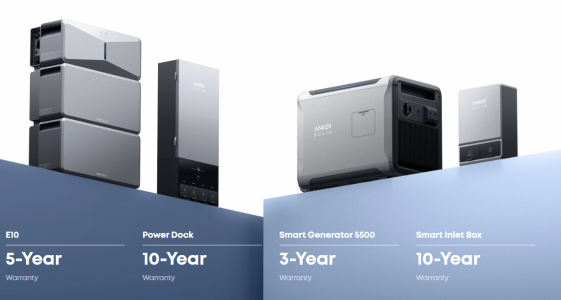
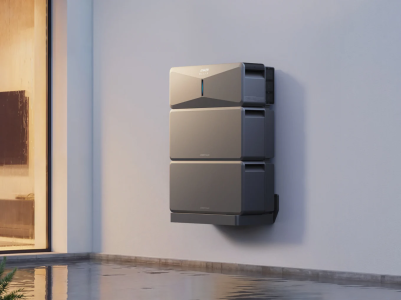
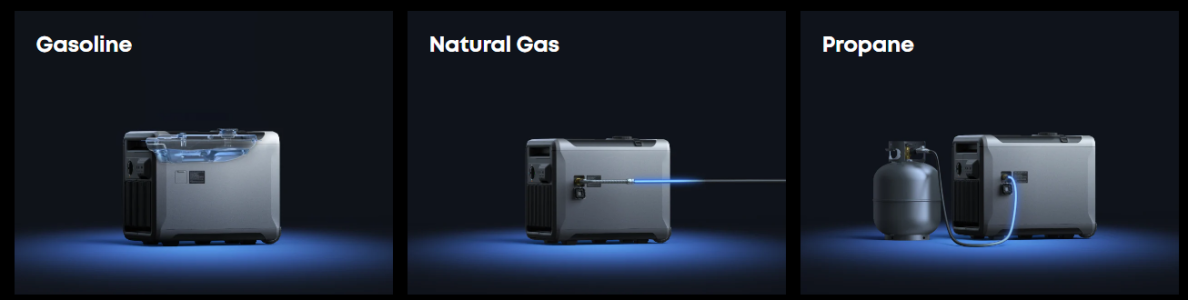
Anker's Solix E10 battery backup can power your entire house in a blackout
Anker is going up against Tesla in the home battery backup segment with Solix E10 that promises "whole-home backup" and one-stop installation services.
As for pricing, the Solix E10 costs $4,299 by itself, $4,599 with the Smart Inlet Box, $5,799 with the Solix Power Dock and $7,399 with the Solix Power Dock and Smart Generator. Adding an extra E10 unit would boost the latter price to around $10,000.
Website:
Anker SOLIX E10 is a Whole-Home Backup System, uniting battery, solar and a smart generator to keep your home always powered with ease.
Neat features:
Auto Start/Stop | Noise-Aware Scheduling
Quiet Power
5 Hours of Charging, 24 Hours of Peace
Unlike gas generators that roar all day and night, E10 charges its batteries with smart generator during off-peak hours (about 5 hours daily), then powers your home silently for the full 24 hours. No constant engine noise. No fuel runs. No disturbing your neighbors—or your own sleep. Just clean, quiet energy on your schedule.
Predictive Weather Alerts | Automatic Pre-Storm Recharge | Power Level Reminders
Always One Step Ahead of the Storm
E10 proactively monitors severe weather and charges itself to full capacity using solar and grid power-so you don't have to. When outcages strike, timely power level reminders keep you informed, ensuring you're prepared for anything the storm throws your way
37kW-66kW Surge Power Start It All
Even 5-Ton Central A/C
Up to 37.2kW (155 LRA) surge power per unit starts a 5-ton central AC. Dual E10 deliver 66kW (275 LRA) for simultaneous 5-ton and 3-ton systems.
Power Whole-Home All at Once
One E10 delivers 10kW turbo output for up to 90 minutes and 7.6kW continuous output, covering whole-home peaks and always-on power demand. Expandable to 30kW Turbo and 22.8kW continuous output with 3 E10s, even high-consumption families are well covered.
Smart Hybrid Whole-Home Backup Solution:
1. Battery storage
2. Solar charging
3. Smart tri-fuel generator
≤20ms Seamless Switchover
Backup power activates in under 20ms — preventing equipment damage and data loss. Traditional standby generators take 10-30 seconds, leaving your home dark while cranking. Fully automated — no switches, no timing, no worries.
Installation:
1. DIY
2. Technician
Batteries:
1. Single E10 + 1 Pack: 28.8kW (120 LRA)
2. 2+ Packs: 37.2kW (155 LRA)
3. Dual E10: 66kW (275 LRA)
Automotive-grade LFP cells
10-year lifespan, 4,000+ cycles, -4°F to 131°F range.
I like it!
Kaido
Elite Member & Kitchen Overlord
Kaido
Elite Member & Kitchen Overlord
Samsung vented combo washer/dryer review: (video is ~30 minutes)
1. ~95-minute real cycle
2. ~4.5-hour max cycle (ex. huge comforter)
3. Can hold 16 pounds of clothes
4. Wi-Fi push notifications for job complete (smarthouse integration as well)
5. Tank refill saves ~30 cents per load & can run 25 loads with detergent & softener before refilling
6. Time delay feature (run at night, away from home, etc.)
www.samsung.com
1. ~95-minute real cycle
2. ~4.5-hour max cycle (ex. huge comforter)
3. Can hold 16 pounds of clothes
4. Wi-Fi push notifications for job complete (smarthouse integration as well)
5. Tank refill saves ~30 cents per load & can run 25 loads with detergent & softener before refilling
6. Time delay feature (run at night, away from home, etc.)
Bespoke AI Vented Laundry Combo™ All-in-One Washer Dryer in Brushed Black | Samsung US
Shop the Bespoke AI Vented Laundry Combo™, All-in-One Washer Dryer in Brushed Black with Super Speed wash, extra large capacity, & vented electric dryer.
www.samsung.com
Last edited:
Kaido
Elite Member & Kitchen Overlord
So everything old is new again. Ideas that flopped get revived after a couple generations forget them.Samsung vented combo washer/dryer review: (video is ~30 minutes)
1. ~95-minute real cycle
2. ~4.5-hour max cycle (ex. huge comforter)
3. Can hold 16 pounds of clothes
4. Wi-Fi push notifications for job complete (smarthouse integration as well)
5. Tank refill saves ~30 cents per load & can run 25 loads with detergent & softener before refilling
6. Time delay feature (run at night, away from home, etc.)
Bespoke AI Vented Laundry Combo™ All-in-One Washer Dryer in Brushed Black | Samsung US
Shop the Bespoke AI Vented Laundry Combo™, All-in-One Washer Dryer in Brushed Black with Super Speed wash, extra large capacity, & vented electric dryer.
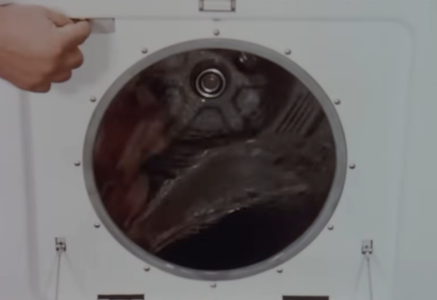
Bendix Duomatic (1953) and several other brands throughout the 1950's didn't survive for many reasons, we'll see how these do or flop. 🙄
Kaido
Elite Member & Kitchen Overlord
Kaido
Elite Member & Kitchen Overlord
Kaido
Elite Member & Kitchen Overlord
So everything old is new again. Ideas that flopped get revived after a couple generations forget them.
Bendix Duomatic (1953) and several other brands throughout the 1950's didn't survive for many reasons, we'll see how these do or flop. 🙄
Oh yeah, he addresses that in the video...the OG price equivalent today with inflation would be $5,000 USD 😳
Surprisingly, he gave the unit pretty high marks on the cleaning tests. With the price drop from $2,800 to $2,000, that helps compared to modern standalone pricing:
* Standalone washer: ~$700 to $1,300
* Standalone dryer: ~$800 to $1,200
* Washer + dryer set: ~$1,000 to $2,300 on average
What I like:
1. Uses normal detergents
2. One cycle for everything (I have ADHD & forget to swap alll the time LOL)
3. Vented (most are ventless)
4. One compact unit
5. Actually-useful smarthome features:
a. Alerts (phone, Alexa, smarthome, etc.) when done
b. Doorbell camera integration (see visitors on the lol)
c. Schedule the runs when away from home, at night, or off-peak for cheaper power
d. Adjusts washer & dryer as needed
What I don't like:
1. Single point of failure
2. Still pretty expensive


TRENDING THREADS
-
 Discussion Zen 5 Speculation (EPYC Turin and Strix Point/Granite Ridge - Ryzen 9000)
- Started by DisEnchantment
- Replies: 25K
-
Discussion Intel Meteor, Arrow, Lunar & Panther Lakes + WCL Discussion Threads
- Started by Tigerick
- Replies: 25K
-
 Discussion Intel current and future Lakes & Rapids thread
- Started by TheF34RChannel
- Replies: 24K
-

-
