• We’re currently investigating an issue related to the forum theme and styling that is impacting page layout and visual formatting. The problem has been identified, and we are actively working on a resolution. There is no impact to user data or functionality, this is strictly a front-end display issue. We’ll post an update once the fix has been deployed. Thanks for your patience while we get this sorted.

Question 4x4gb 3000mhz, but individually run at 2133mhz

IseNoseee

Junior Member
So, my ram advertises 3000mhz, do they have to run at 3000mhz individually? Is that i wanted to put my ram to atleast 2933mhz. The problem, is that, even putting them at 2400mhz my pc keeps rebooting with no signal on my monitor until it detects that there is a problem and boots up to bios. How can i make it stabilize on higher mhz? Should i better be staying on 2133mhz on my modules? (Keep in mind that im still a newbie on this, and i havent tried to touch dram voltages and all that)
 
Cpu is ryzen 5 2400g and mb is b450.
You might be limited by your CPU's memory controller (IMC). With 2 single rank DIMMs per channel only 2133 MHz is guaranteed for Zen/Zen+.
My motherboard with a Ryzen 2700x and 2 dual rank DIMMs wouldn't boot with a memory clock higher than 1866 MHz at first. But after I updated the BIOS to a newer Zen 2 compatible version it would go up to 3066 MHz.
But don't update your BIOS without checking if your CPU will still be compatible with the newer BIOS version, support for older APUs is often dropped with newer BIOS versions.
 
You might be limited by your CPU's memory controller (IMC). With 2 single rank DIMMs per channel only 2133 MHz is guaranteed for Zen/Zen+.
My motherboard with a Ryzen 2700x and 2 dual rank DIMMs wouldn't boot with a memory clock higher than 1866 MHz at first. But after I updated the BIOS to a newer Zen 2 compatible version it would go up to 3066 MHz.
But don't update your BIOS without checking if your CPU will still be compatible with the newer BIOS version, support for older APUs is often dropped with newer BIOS versions.
hi, will a ryzen 5 1600af solve this problem?
 
hi, will a ryzen 5 1600af solve this problem?
You can expect it to achieve higher RAM clocks, but there's also always a bit of luck. And with the 1600 AF the BIOS update should be unproblematic, I would still check though.
I would expect 2400-2666 MHz with the 1600 AF. And with a BIOS update more than that, 1933 MHz wouldn't surprise me.
 
Having all four of your memory slots will drop the achievable speed. It differs with each Ryzen generation, but there is a achievable speed penalty vs. only running 1-2 modules. There's also the whole DR/SR factor as well.
 
Having all four of your memory slots will drop the achievable speed. It differs with each Ryzen generation, but there is a achievable speed penalty vs. only running 1-2 modules. There's also the whole DR/SR factor as well.
oh so its way way better to run 2 modules at higher speeds than 4 modules at those speeds?
 
Doesn't your board have a XMP profile for the ram in bios?
If you set it at XMP it should auto to rated ram speed with voltage.


It should be the same on AMD... look for XMP profile in RAM settings under bios.

But your system is hanging because you are not giving your ram enough voltage as you stated.
Default JDEC specs are ram running at 1.2v.... XMP boosts that to 1.3-1.4 to get the 3000mhz speed your ram is listed.
Running ram at near 3000mhz on 1.2v means u got some cherry golden ram IC's.... meaning not many people get this lucky, which is why your system wont post.

Run the ram @ XMP profile in bios, or boost your ram voltage to 1.4 initially, and then run some tests, pass, lower it to 1.35 repeat.... until you find that line where if you go any lower your system becomes unstable.
 
Last edited:
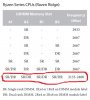
While looking at another user manual in a different thread, I came across the memory support chart for 'Raven Ridge' CPUs (what generation your CPU is), and for your particular CPU, you are looking at being to run all four modules at 2133 - 2400 (unless all four DIMMS are single rank). So in that case, there's not enough difference between those speeds to really matter that much. So if it's only stable at 2133 speeds, just leave it be.

Are the modules you use on either the motherboard's or memory manufacturer's QVL list? If not, that could be another reason anything higher than 2133 is crashing.

22.jpg
 
Back
Top