• We’re currently investigating an issue related to the forum theme and styling that is impacting page layout and visual formatting. The problem has been identified, and we are actively working on a resolution. There is no impact to user data or functionality, this is strictly a front-end display issue. We’ll post an update once the fix has been deployed. Thanks for your patience while we get this sorted.

Question How to Find Cause of Shutdown

EXCellR8

Diamond Member
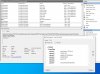
I recently discovered that some mornings my home "server" needs to be manually powered back on. Looking in the event viewer there's clearly something logged, mentioning wininit.exe with a loopback address, but I'm not sure how to go about what is actually causing the system to power off. My best guess, at this time, is something to do with the recently mapped LUN's and my backup software (SyncBack) but nothing in the Task Scheduler seems to indicate that the shut down signal is associated with that (my backups and syncs typically run between 2am and 7am). Does anyone have any advice on how to figure out what the root cause of this is? Keep in mind that it's not rebooting, but shutting down entirely. So, I figure this rules out system updates or antivirus.

I may disable backups for a short while to see if the shut downs stop.
 

Attachments
  • legacyShutdown.JPG
    legacyShutdown.JPG
    164.6 KB · Views: 13
Last edited:
It looks more like a reboot with the timestamps for DHCP within a minute after. My first guess would be WU causing a reboot after they're applied.

I would be more interested in the error above it.
 
Well, if you're running hyper-v that should rule out a driver issue.

Assuming the bare metal is powered off not just the container would lead me to physical power issues though it could be triggered by the guest. Or there could be a packet triggering the shutdown.
 
thought i may have figured it out but turns out not to be the case. the system got shut down around 1:30 this morning but the only thing logged is Event ID 6008, which indicates an unexpected shut down.

so frustrating...
 
I recently discovered that some mornings my home "server" needs to be manually powered back on.
It's not a server if it's having issues like that. Servers are ROCK SOLID. Heck, even the Dell Optiplex PCs in my office are rock solid. There's some hardware incompatibility or some driver causing some sort of conflict. Finicky RAM could be a major contributor. What are the specs?
 

Applicable to windows 10 too

Thanks, had to enable the event tracker in group policy but maybe that'll shed some light on the cause; it'd be great if it actually inhibited the shutdown process. Not holding my breath there though.

I'm also going to let process monitor capture overnight to see if I can pinpoint the exact time the shutdown gets triggered.
 
Back
Top