• We’re currently investigating an issue related to the forum theme and styling that is impacting page layout and visual formatting. The problem has been identified, and we are actively working on a resolution. There is no impact to user data or functionality, this is strictly a front-end display issue. We’ll post an update once the fix has been deployed. Thanks for your patience while we get this sorted.

Question Intel Socket 1151 motherboard with "PMC Maxview storage manager?"

boed

Senior member
Hello,

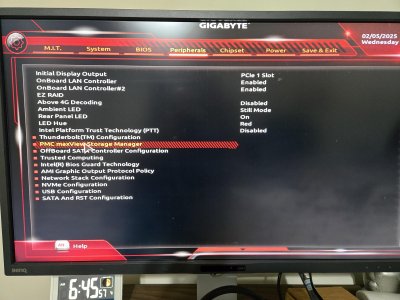
I need to replace my old asrock z390 motherboard - it served a long time but suffered some damage in a move. I could try to find a similar one but I have an older Gigabyte z170x-g1 gaming motherboard (different socket) that has an AMI bios and has something called "PMC Maxview storage manage" on the bios. This is going to be a spare serve build with a raid controller on it and having the storage manager on the motherboard actually is handy at times. I'm not sure if it was on any motheboards that support the i7-8700K - intel socket 1151.
 

Attachments
  • 20250205_064558.jpg
    20250205_064558.jpg
    318.4 KB · Views: 3
Last edited:
PMC MaxView Storage Manager is an application intended for use with particular RAID controllers from Adaptec/Microchip/PMC. The Gigabyte Z170x-G1 did not use any discrete or external RAID controller/adapter from these companies. It had an ASMedia SATA controller that supported only AHCI.

If the system using the Gigabyte board had an add-in RAID controller card installed (PCI Express), the application would follow the RAID card/controller.
 
Last edited:
PMC MaxView Storage Manager is an application intended for use with particular RAID controllers from Adaptec/Microchip/PMC. The Gigabyte Z170x-G1 did not use any discrete or external RAID controller/adapter from these companies. It had an ASMedia SATA controller that supported only AHCI.

If the system using the Gigabyte board had an add-in RAID controller card installed (PCI Express), the application would follow the RAID card/controller.
Thanks - it was a system with a raid controller added but why did that not show up in the bios on my z390 when I put the same card in it? It isn't an application for windows it is a function in the bios of the motherboard.20250205_064558.jpg
 
Last edited:
This is not from a retail Gigabyte Z170x Gaming G1 motherboard. It is from some kind of OEM manufacturer that is using a system integrator version of the Z170x-G1. Possibly even a Gigabyte branded prebuilt gaming PC. These may have different features or options, and use a custom BIOS. Another possibility is that you are running some customized/modded BIOS.

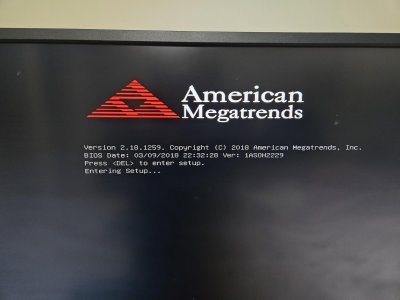
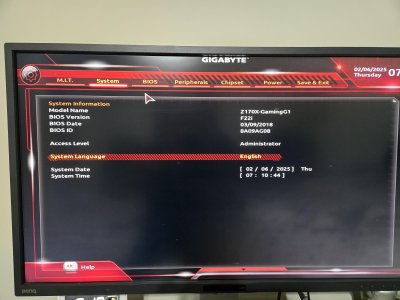
Please post screen shots of the identifying BIOS details, versioning, build date, manufacturing date, System or System Information page, etc. (advanced view)
 
Last edited:
Actually I built the PC from scratch myself - this is what amazon sold. I downloaded the latest firmware direct from Gigabyte - no special section of their web page.
 
Ah I stand corrected! I forget that newer UEFI system BIOS can shell a peripheral orom into the system BIOS options. What is the ASRock board you have and is it running in UEFI mode?

Is the RAID controller updated to latest UEFI-ready firmware? It is working with the Gigabyte board, so it sound like it could be an issue with the ASRock BIOS properly handling/supporting the UEFI HII package supported by the RAID card. Or isn't configured properly to display it.
 
Last edited:
The old asrock board I need to replace is a taichi z390 - it does not have the AMI bios or the maxview option. I'm looking for a motherboard that supports the 8th gen intel processor and the HII will work with it.

The raid controller is indeed UEFI ready however not all motherboards support acccess to it.
 
Back
Top