
• We’re currently investigating an issue related to the forum theme and styling that is impacting page layout and visual formatting. The problem has been identified, and we are actively working on a resolution. There is no impact to user data or functionality, this is strictly a front-end display issue. We’ll post an update once the fix has been deployed. Thanks for your patience while we get this sorted.

Keep all hosts connected even after a router breaks down

Veoxer

Junior Member
I'm still quite the beginner when it comes to networking and i faced a problem to which i wasn't able to figure out the right answer.

The hubs are of type Ethernet. The routers have ethernet interfaces. Router 3 has an additional interface of another type that allows it to connect to the internet.
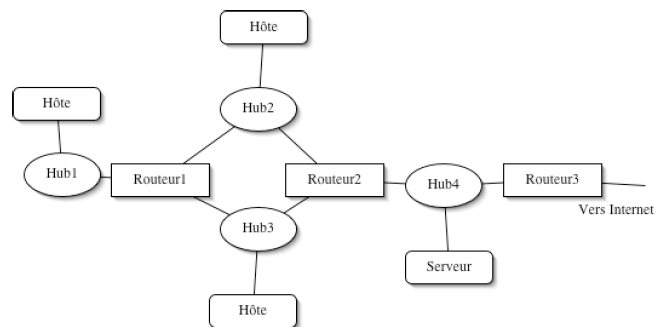
UKk0D.png


So the problem is that in case Router 1 broke down, how to keep all machines on the intranet connected and capable of communicating with each other and with the outside. That been said, the solution requires the minimal changes possible of the topology and the configuration and there is no other router to replace the broken one with.

I just wasn't able to come up with any working solutions.
 
I do not know what is the security consideration as far as Networks separation goes

The Network behind Router 1 can to be connected to Router 2 and its IPs range have to be change to fit Router 2.

The Network would function but the separation of the Network behind Router 1 would be gone.


😎
 
"Faced a problem" as in "homework problem"?
The network in picture as it was before the start and the Router1 has just broken down?
Your "problem"/"task" is to salvage the situation with minimal steps?

I do now assume things that you did not tell and say: plug Hub1 into Router2.
 
You see how hub 2 and hub 3 are connected to multiple routers? Do that.
There is nothing wrong with that in itself. In fact, if you want redundancy in your network, your hosts need to be connected to 2 routers anyway.

Veoxer, the technology you want to look at is the VRRP protocol. Or, if you have all cisco equipment, the HSRP protocol. Those technologies exist specifically to solve the problem you are facing.
https://en.wikipedia.org/wiki/Virtual_Router_Redundancy_Protocol

With VRRP you configure 2 (or more) routers that are connected to the same layer-2 domain (e.g. the same ethernet hub/switch) to create a "virtual router". This virtual router has its own IP address, and a made-up mac-address. One of the routers is the primary and will take the packets destined for the virtual router's mac address off the ethernet and forward them. If the primary vrrp router fails, the secondary router will take over. That's the basic idea. There are many extra things you can do, like configuring 2 virtual routers so you can do load-balancing, etc. But just start and try to get a basic VRRP set-up working. There must be lots of documentation on the web, because VRRP is a protocol widely used.

Even with VRRP your network design does not look good. E.g. if routeur2 fails, all devices connected to router1 will lose their Internet-connectivity. Not good. Also, in case you didn't do that yet, you need to make your DHCP-server redundant, so that if the primary DHCP-server (one of routeur1 or router2) fails, the other router can take over.

I don't have a drawing, but this is a description how I would design your network, with the equipment you have:
Code:
Internet
   |
Routeur3
   |
  Hub --- Serveur
   |   \
   |     \
Router1   Router2
   |   \  /   |
   |   /  \   |
  Hub       Hub
  / | \      / | \
 hosts     hosts
Add more hubs if you need to. Connect each hub to both routeur1 and router2.
Configure VRRP on the interfaces of router1 and router2 that connect to the hubs that connect to the hosts.
Run a routing protcol (OSPF or ISIS) on routeur3, router2 and router1.
That would be the proper way to set up this network, imho.
 
Last edited:
Back
Top