

jhadipak
Junior Member
Hello,
I have a wireguard server running in an EC2 instance in AWS. I am tring to use this server as a means to connect from my laptop (in public space) to my home network . I have a raspberry pi on my home LAN which runs a wireguard client to connect to the wireguard server in the cloud. My laptop, connected to the open internet (outside my home network), also runs a wireguard client to connect to the same wireguard server in the cloud.
Both wireguard clients and the wireguard server are on subnet 192.168.25.0/24 and my home LAN uses subnet 192.168.1.0/24.
When all wireguard interfaces are up, my laptop is able to ping the wireguard server in the cloud and also my raspberry pi but I have not been able to figure out how to tunnel traffic from my laptop to other hosts on my home LAN. I have tried several changes to the configuration related to AllowedIps, ip routes etc but none of them has worked.
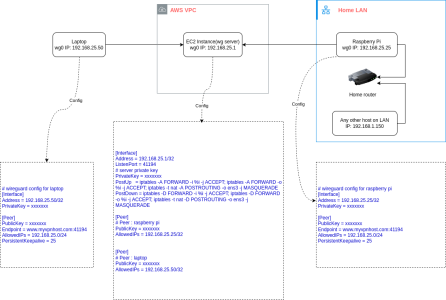
A diagram showing the entire setup and configuration details of all components involved is attached to this post for quick and easy reference.
I would be very grateful if someone could suggeat a solution to my problem.
Regards,
Dipak
I have a wireguard server running in an EC2 instance in AWS. I am tring to use this server as a means to connect from my laptop (in public space) to my home network . I have a raspberry pi on my home LAN which runs a wireguard client to connect to the wireguard server in the cloud. My laptop, connected to the open internet (outside my home network), also runs a wireguard client to connect to the same wireguard server in the cloud.
Both wireguard clients and the wireguard server are on subnet 192.168.25.0/24 and my home LAN uses subnet 192.168.1.0/24.
When all wireguard interfaces are up, my laptop is able to ping the wireguard server in the cloud and also my raspberry pi but I have not been able to figure out how to tunnel traffic from my laptop to other hosts on my home LAN. I have tried several changes to the configuration related to AllowedIps, ip routes etc but none of them has worked.
A diagram showing the entire setup and configuration details of all components involved is attached to this post for quick and easy reference.
I would be very grateful if someone could suggeat a solution to my problem.
Regards,
Dipak


