• We’re currently investigating an issue related to the forum theme and styling that is impacting page layout and visual formatting. The problem has been identified, and we are actively working on a resolution. There is no impact to user data or functionality, this is strictly a front-end display issue. We’ll post an update once the fix has been deployed. Thanks for your patience while we get this sorted.

Question 2-handed mouse for injured right fingers?

bandgit

Member
Old age sucks, so after computing basically nonstop since 1978, my right hand's index and middle fingers are almost non-functional. I think that the best configuration for me would be to have input devices on both sides of my keyboard. I can cup my right hand around a mouse, but clicking and scrolling has become nearly impossible. So a movable "right hand mouse" does the cursor moving and a fixed "left hand mouse" has right click, left click and scroll wheel.

I have not been at all successful at locating anything in this configuration. Have there been any of these types of mice manufactured, or should I jerry-rig two existing mice?
 
you can just get a left handed mouse (most are unfortunately ergo vertical types) or ambidextrous symmetrical mice (logitech or hp).
or you can keep your current mouse and get pc foot pedal switches for the LMB RMB.
 
you can just get a left handed mouse (most are unfortunately ergo vertical types) or ambidextrous symmetrical mice (logitech or hp).
or you can keep your current mouse and get pc foot pedal switches for the LMB RMB.
I have read rather poor reviews of the foot pedal switches as they seem to not only stress your foot muscles (that's all I need now) but also have very poor feel and control. The problem with getting right and left handed mice is that I want to segregate the functions. I only want cursor control on right and only clicks and scroll on the left. I don't think that the Logitech (or other) software will allow for full deactivation of those functions on the specific mouse. Preferably the left mouse would be fixed to the keyboard as I don't want it to be sliding around. I was also thinking that the left device could be something like the Kensington Slimblade maybe with the trackball removed?
 
An odd thought, maybe. I seem to recall that I have had systems running with TWO ordinary mice connected and BOTH functioning. I think I may have had one plugged into the mobo PS/2 Mouse port, and the other as a USB mouse.But maybe not necessarily that different. MAYBE it is best to use those two separate types of ports so the respective mouse drivers have no difficulty dealing with two similar devices. Anyway, both mice could work. Try simply plugging in two mice. You may find it hard to get a mouse with a PS/2 plug on the end these days. But any simple USB mouse can be fitted with an adapter like this


so you can plug it into the mobo PS/2 port. NOTE that this one has a FEMALE USB socket to accept the plug form a USB mouse, and a MALE PS/2 plug to go into the mobo rear port.
 
With win 10, You can plug in two usb mice and they both work. I just did this a few minutes ago. I also had a ps/2 mouse connected at the same time. ALL THREE mice seemed to work fine.
 
Another thing @Paperdoc A lot of those small PS/2 to USB adapters will only work if the mouse itself was designed to use either PS/2 or USB.

Apparently, they just electrically connect the pins of the two types of connector and have no internal electronics to convert the signal. Just another thing to watch out for.
 
Jimminy, you are right - the adapter merely makes connections to the correct pins, no signal conversion involved. My understanding is that the standard connection lines for both those types of ports are the same, so that's why it works for any simple mouse. I can understand, though, that some more complex mouse designs with added features might not work if the driver used includes support for its non-standard features.
 
I appreciate the comments but I am a bit confused now. Let's take this hypothesis: I have a trackball similar to a Kensington Slimblade where I have removed the trackball itself. That is hard mounted on the left of my keyboard. Then I have a conventional PS/2 or USB mouse on the right where I have deactivated (by software or by physical blocking of the right and left clicks) those functions. Would they interfere with each other's signals or ???
 
No, I think that would work. In fact, I believe you would not even need to de-activate the controls you mention on each. The system would not have any problem with having all items available. Those items do nothing until you actually push a button or move the mouse (or trackball). But it might be more convenient for YOU. I can see that accidentally hitting a mouse button on the right instead of using the buttons on the trackpad might generate an action you did not intend.
 
on usb with modern windows you can have multiple input devices. i have 2 mice on my current pc, one for gaming one for regular use. both will move the cursor and input lmb/rmb/etc. movement of both will send conflicting cursor motion, but if you put tape over the sensor or remove your trackball that shouldnt be an issue.
 
^ This. IIRC you could use two USB mice-like-devices, ever since WinXP if not earlier still.

If one is hard mounted, no need to deactivate it moving the cursor, or you could put a piece of opaque tape over the sensor.

However, I am wondering why you don't just do everything with your left hand. It will seem awkward at first, especially with it being your non-dominant hand, but you will build up more fine muscle control and get much better at it over time.

I had to do that long ago, being left handed, but so often encountering workstations with the mouse on the right side, or the mouse wasn't ambiedexterous.

I should also mention that (on systems I've set up for my own use) I do my mousing with my wrist planted still, all mouse movements are done with fingers. This works well with a good laser mouse, not so much on a battery/power conserving LED sensor cordless mouse, as they often have too much lag and too low a sensitivity for good tracking of smaller movements.

Once I get finger arthritis I may change that, start using my arm to move the mouse.
 
Once I get finger arthritis I may change that, start using my arm to move the mouse.
No need. You can use a trackball like I use. I keep my wrist down on the desk. One finger only moves the trackball. My right hand is badly crippled except for the thumb and first finger, which half way work.
 
^ I have a trackball. It's crap compared to just a little time training /using my other hand which I did years ago. If someone has debilitation in both hands, I can see it.
 
An odd idea, maybe, to contribute. I don't remember exactly now why I had this issue. I believe it was a cramped office layout. Anyway, I had to use my LEFT hand for the mouse, and I just did it. Did not even try to switch which button was which. I just trained my brain (not hard, it turned out) to do things that way.
 
Aren't there some device which would plug into the USB port to allow operators their own custom switches even if it literally means gluing switches or a scroll wheel to the edge of a keyboard and soldering some wires in?
 
Aren't there some device which would plug into the USB port to allow operators their own custom switches even if it literally means gluing switches or a scroll wheel to the edge of a keyboard and soldering some wires in?
You could solder up custom switches to almost any mouse and mount whatever type of switch you want (assuming NO - normally open, momentary type like a mouse has), anywhere you can devise a way to mount it, but the harder part is reinventing the wheel mounting with careful alignment to the sensor TX/RX on both sides of the wheel, and how to do the X/Y axis movement which is probably just as easy to do with a standalone touchpad or trackball if not using a keyboard with one or the other built in.

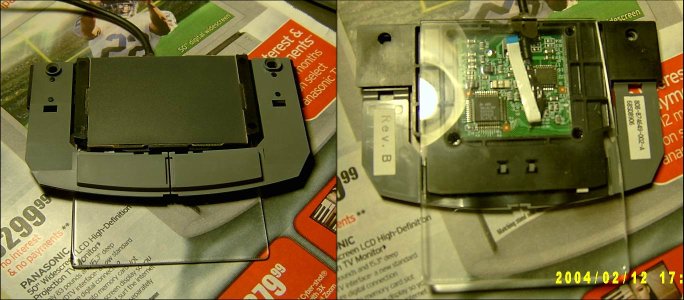
Once upon a time ago, I bought some surplus touchpads meant for laptops at an electronics surplus site ( which has since gone out of business - this was several years ago, as it had a PS2 interface wiring if that gives you any idea), wired a PS2 mouse cord up to them, and mounted on a piece of plexiglass. Turned out that I don't really like using a touchpad unless I'm forced to. 😉
 

Attachments

  • laptop touchpad 1.jpg
    laptop touchpad 1.jpg
    104.6 KB · Views: 4
Last edited:
Back
Top