• We’re currently investigating an issue related to the forum theme and styling that is impacting page layout and visual formatting. The problem has been identified, and we are actively working on a resolution. There is no impact to user data or functionality, this is strictly a front-end display issue. We’ll post an update once the fix has been deployed. Thanks for your patience while we get this sorted.

[Part 1] Measuring CPU Draw Call Performance

MajinCry

Platinum Member
(Part 2 - Much more appropriate settings!)

Before Intel released their Core 2 architecture, their CPUs had the same level of draw call performance as their AMD performance equivalents. Trouble is, Core 2 was several times (>3x) better at handling draw calls then it's predecessors, as well as AMD's competing architectures.

The draw call gap has only been widening, and AMD has not made the same leap in performance. An FX 8350 has damn near the same performance deficit with draw calls, as a 965 BE. With AMD making a big hubbub over Zen's gaming capability, they better have made the same jump as Intel, or it's dead in the water.

Sure, there's Direct3D 12 and Vulkan, but those APIs aren't going to be back-ported. Oblivion's still going to be stuck with a crummy Direct3D 9 renderer.


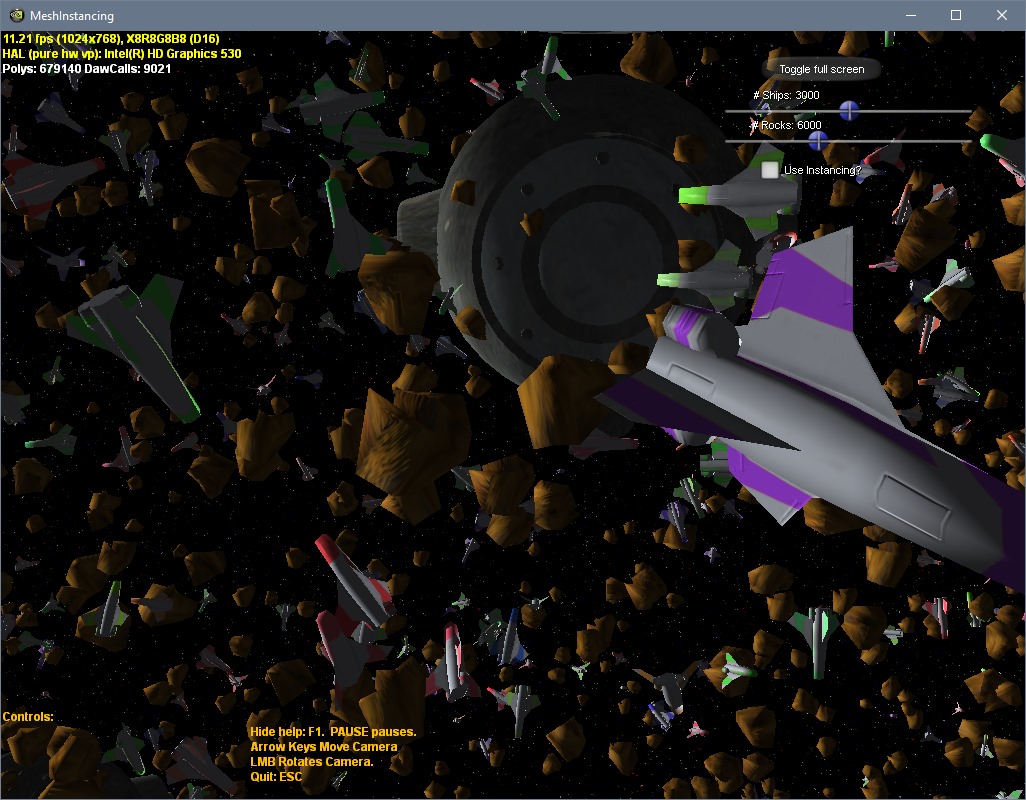
Now that we have a firm date for Zen's release, it's time we collect some data. My initial idea was to compare performance in Fallout New Vegas, with an emphasis on draw calls, but the creator of ENBSeries (reverse engineers Bethesda's renderers) pointed me to an excellent Direct3D 9 draw call demo, which you can download here, or from this mirror.

vH6rjT.jpg

And my driver settings:

yQYJut.jpg

Post your specs, the draw calls, and the framerate displayed in the demo. Keep the number of rocks and ships the same, as well as having instancing disabled. You can use the arrow keys to fine tune the object sliders.


The second post of the thread will be where I compile our results. Use the format below when posting them:


CPU:
GPU:
GPU Driver:
OS:

Ships:
Rocks:
Draw Calls:
FPS:
 
Last edited:
Results

3000_6000.png


MajinCry
CPU: Phenom II x4 965 BE @ 3.4ghz
GPU: AMD 7850 2GB
GPU Driver: 16.12.2
OS: Windows 7 64bit

Ships: 3000
Rocks: 6000
Draw Calls: 9021
FPS: 7.02 - 7.20


TheElf
CPU: g1820
GPU: Gtx650
GPU Driver: 378.49
OS: Windows 10 64bit

Ships: 3000
Rocks: 6000
Draw Calls: 9021
FPS: ~9.4


f2bnp
CPU: FX 8320 @ 4GHz
GPU: RX 480 8GB
GPU Driver: 16.12.1
OS: Windows 10 64bit

Ships: 3000
Rocks: 6000
Draw Calls: 9021
FPS: 7.11 - 7.31


Face2Face
CPU: i7 5820K @ 4.25GHz
GPU: GTX 980 Ti
GPU Driver: 378.66
OS: WIndows 10 Pro 64bit

Ships: 3000
Rocks: 6000
Draw Calls: 9021
FPS: 14.85


Mr. Evil
CPU: FX 8370E
GPU: Fury
GPU Driver: 17.1.2
OS: Win 7 x64

Ships: 3000
Rocks: 6000
Draw Calls: 9021
FPS: 7.02-7.25


.vodka
CPU: i5 2500k @ 4.5GHz
GPU: Sapphire R9 290 Tri-X @ 1075/1375
GPU Driver: 17.2.1, configured as per OP
OS: Windows 10 Pro x64

Ships: 3000
Rocks: 6000
Draw Calls: 9021
FPS: 13.95-14.07

---

CPU: i5 2500k @ 5.1GHz
GPU: Sapphire R9 290 Tri-X @ 1075/1375
GPU Driver: 17.2.1, configured as per OP
OS: Windows 10 Pro x64

Ships: 3000
Rocks: 6000
Draw Calls: 9021
FPS: 15.53-15.85


SPBHM

CPU: i5 2310 stock
GPU: HD5850 stock
GPU Driver: 15.11.1
OS: Windows 10 64bit

Ships: 3001
Rocks: 6017
Draw Calls: 9039
FPS: 9.55

---

CPU: i5 2310 stock
GPU: HD5850 stock
GPU Driver: 10.7
OS: Windows XP SP3

Ships: 3001
Rocks: 6017
Draw Calls: 9039
FPS: 8.49


dogen1
CPU: Pentium G3258 4.2GHz
GPU: GTX 950
GPU Driver: 378.49
OS: Windows 7 64 bit

Ships: 3000
Rocks: 6000
Draw Calls: 9021
FPS: 16.50


Lebdnil
CPU: Core i5-6600 stock (3.83GHz)
GPU: HD530 integrated (1.15GHz)
GPU Driver: Intel 4590
OS: Windows 10 64 bit

Ships: 3000
Rocks: 6000
Draw Calls: 9021
FPS: ~11.2


FrostigerFinger
CPU: Intel Core i7 860 @ 3.60Ghz
GPU: AMD Radeon HD 7950
GPU Driver: 16.12.1
OS: Windows 7 64 bit

Ships: 3000
Rocks: 6000
Draw Calls: 9021
FPS: ~9.05
 
Last edited:
CPU: g1820
GPU: Gtx650
GPU Driver: 378.49
OS: Windows 10 64bit
Ships: 3000
Rocks: 6000
Draw Calls: 9021
FPS: ~9.4

AMD Phenom II X4 965 (125W, BE) vs Intel Celeron G1820
7+35% = 9.45 so basically this is testing your single thread score,no wonder that you have the feeling that amd lags behind in draw calls if it's based on single core performance.

Draw calls aren't too affected by single threading prowess, actually. Supposing my test I did with a user over on the ENB forums is valid, the i7 920 is just a tad better at ST than my 965. In Fallout 4, however, when we purposely made the scene draw call limited, he got a steady 60 whilst I got ~15fps. Fits perfectly with AMD's draw call deficit. See this post by the ENB dev.

If i remember, this was not the same in times of Pentium4, Core architecture did these improvements and each generation usually do better. According to the tests, increasing frequency of AMD cpu have very little impact on draw calls performance, while increasing cpu frequency of Intel affect it almost linear.

Also different motherboards for Intel play some role too (up to 10-20%). Not just draw calls performance, but triange count per second (in dx9 at least) limited for AMD cpu.

Very stupid that AMD Athlon x2 gives about same bottleneck as tested more recent releases (for 3 or 4 years ago tested). In dx11 things should be different, but still i think the problem exists.

I wonder if Intel's bottom-of-the-barrel low end were gimped somehow.
 
Look at the screenshot,I don't know what the test in fallout did but the demo from your link hits 48% usage on one thread (50% is one of two cores so it uses 96% of a single core) draw calls might not have anything to do with singlecore but this here demo is measuring single core performance.
 
Look at the screenshot,I don't know what the test in fallout did but the demo from your link hits 48% usage on one thread (50% is one of two cores so it uses 96% of a single core) draw calls might not have anything to do with singlecore but this here demo is measuring single core performance.

I wonder if there's driver differences at play. Don't NVidia GPUs (post 9800GTX) have a software scheduler, which puts a bigger burden on the CPU? Curious to see how an AMD GPU would fare on the same setup.
 
For this demo it doesn't matter since it only runs two threads, main thread tops out while the driver hovers at 16% it has plenty of CPU resources left to run faster if it had to.

And no, if you are referring to the threaded driver it just works similar to dx12 cutting up the workload into several threads so they can be dealt with quicker,it's still the same workload.
 
Maybe running this test with instancing on as well would shed more light into the matter.
Now you see that the driver practically disappeared dropping to below 0.5%
,in a game that has several threads this kind of difference is substantial.
QsAQQzo.jpg
 
Maybe running this test with instancing on as well would shed more light into the matter.
Now you see that the driver practically disappeared dropping to below 0.5%
,in a game that has several threads this kind of difference is substantial.

It seems that my Direct3D 9 driver is doing quite a bit less work (~0.24%, doubled for parity with your dual core), and my framerate is still lower.
IxjYsf.jpg
IxjYsf.jpg[

Now I'm curious.
 
Actually, I just noticed something. If you set one slider to min, and the other to max, instancing makes a massive difference. I think this demo's bugged somehow, when throwing in different base models to instance.

OLVxaR.jpg

For unadulterated draw calls, however, it seems on-point.

Edit: Btw, the framerate dropped when taking a screenshot. Getting ~170fps with instancing on the same scene in the above screenshot.
 
f2bnp
CPU: FX 8320 @ 4GHz
GPU: RX 480 8GB
GPU Driver: 16.12.1
OS: Windows 10 64bit
Ships: 3000
Rocks: 6000
Draw Calls: 9021
FPS: 7.11 - 7.31
 
It seems that my Direct3D 9 driver is doing quite a bit less work (~0.24%, doubled for parity with your dual core), and my framerate is still lower.

Now I'm curious.
Frame rate is tied to how fast the main thread runs,and not the driver
In your first screnie you have 24.9% so one core is fully loaded,on the other it only runs at 6.7 so you get 50 instead of 170FPS
 
CPU: i7 5820K @ 4.25GHz
GPU: GTX 980 Ti
GPU Driver: 378.66
OS: WIndows 10 Pro 64bit

Ships: 3000
Rocks: 6000
Draw Calls: 9021
FPS: 14.85

I've seen frame rates go from 11.5 to 15 FPS. Seems to vary.

dc_zpsxa17d2ul.png
 
CPU: FX 8370E
GPU: Fury
GPU Driver: 17.1.2
OS: Win 7 x64

Ships: 3000
Rocks: 6000
Draw Calls: 9021
FPS: 7.02-7.25

The main thread uses 11%, which is about 1 whole core. The driver thread uses only 3%.
 
CPU: i5 2500k @ 4.5GHz
GPU: Sapphire R9 290 Tri-X @ 1075/1375
GPU Driver: 17.2.1, configured as per OP
OS: Windows 10 Pro x64

Ships: 3000
Rocks: 6000
Draw Calls: 9021
FPS: 13.95-14.07

CGBsVo.png


----------

CPU: i5 2500k @ 5.1GHz
GPU: Sapphire R9 290 Tri-X @ 1075/1375
GPU Driver: 17.2.1, configured as per OP
OS: Windows 10 Pro x64

Ships: 3000
Rocks: 6000
Draw Calls: 9021
FPS: 15.53-15.85

3xXVCV.png
 
Sweet, we have some traffic now.

CPU: FX 8370E
GPU: Fury
GPU Driver: 17.1.2
OS: Win 7 x64

Ships: 3000
Rocks: 6000
Draw Calls: 9021
FPS: 7.02-7.25

The main thread uses 11%, which is about 1 whole core. The driver thread uses only 3%.

TheElf pointed out the same thing. I'm going to come up with a couple of additional slider combos for us to try. See if the numbers get any different, as I expected Intel's CPUs to get in the high twenties or low thirties.
 
since it's DX9 it can run in a lot of different hardware and versions of Windows, I would be curious to see a more recent VGA on older Windows vs Win10
but what I had to test was this

CPU: i5 2310 stock
GPU: HD5850 stock
GPU Driver: 15.11.1
OS: Windows 10 64bit
Ships: 3001
Rocks: 6017
Draw Calls: 9039
FPS: 9.55

CPU: i5 2310 stock
GPU: HD5850 stock
GPU Driver: 10.7
OS: Windows XP SP3
Ships: 3001
Rocks: 6017
Draw Calls: 9039
FPS: 8.49

can't say for sure if the advantage is caused by Win10 or newer driver, probably both.

also not sure if it's important but I think it was running in a window at 1024x768, also the FPS keeps jumping a bit, I used what looked like some of the lowest FPS but fairly stable for a few sec.
 
since it's DX9 it can run in a lot of different hardware and versions of Windows, I would be curious to see a more recent VGA on older Windows vs Win10
but what I had to test was this

-snip-

can't say for sure if the advantage is caused by Win10 or newer driver, probably both.

also not sure if it's important but I think it was running in a window at 1024x768, also the FPS keeps jumping a bit, I used what looked like some of the lowest FPS but fairly stable for a few sec.

I do remember getting higher framerates in general, back when I had an XP partition to compare Windows 7 to. Also been told that Windows 10 is leaner in general than 7, so I wouldn't be surprised.
 
Screenshot_Max_rocks_min_ships.png


With instancing off, 12 fps. With instancing on, 170fps & driver drops to <1.0 core utilization. I'll make a new thread tomorrow, focusing on having mostly just rocks being rendered.
 
CPU: Pentium G3258 4.2GHz
GPU: GTX 950
GPU Driver: 378.49
OS: Windows 7 64 bit
Ships: 3000
Rocks: 6000
Draw Calls: 9021
FPS: 16.50
 
CPU: Pentium G3258 4.2GHz
GPU: GTX 950
GPU Driver: 378.49
OS: Windows 7 64 bit
Ships: 3000
Rocks: 6000
Draw Calls: 9021
FPS: 16.50

At this point, It's pretty clear that Intel's CPUs scale almost linearly with draw calls, whereas AMD's have little to no improvement. Nice to have the numbers to prove it.
 
Hard to say since all three samples have more or less the same single thread speed.

Phenom compared to fx@ ~4Ghz.
http://www.cpu-world.com/Compare/770/AMD_FX-Series_FX-8350_vs_AMD_Phenom_II_X4_965_(125W__BE).html

According to the Cinebench benchmark, Piledriver has slightly higher ST performance at the same clocks. If AMD's CPUs had similar scaling to Intel, the scores in the draw call benchmark would be along the lines of:

965 BE @ 3.4ghz: 7.02
8320 @ 4ghz: 8.49
i5 2500k @ 4.5ghz: 13.95
i5 2500k @ 5.2ghz: 15.53

700 mhz diff = 1.58fps
100 mhz diff = 0.23fps

But we don't see that. This will be more pronounced in the next text, since the app will take up way less CPU time.


CPU: Core i5-6600 stock (3.83GHz)
GPU: HD530 integrated (1.15GHz)
GPU Driver: Intel 4590
OS: Windows 10 64 bit

Ships: 3000
Rocks: 6000
Draw Calls: 9021
FPS: ~11.2


CPU: Core i5-6600 stock (3.83GHz)
GPU: HD530 integrated (1.15GHz)
GPU Driver: Intel 4590
OS: Windows 10 64 bit

Ships: 3000
Rocks: 6000
Draw Calls: 23 (instancing)
FPS: ~19.5

Byes
 
Back
Top