• We’re currently investigating an issue related to the forum theme and styling that is impacting page layout and visual formatting. The problem has been identified, and we are actively working on a resolution. There is no impact to user data or functionality, this is strictly a front-end display issue. We’ll post an update once the fix has been deployed. Thanks for your patience while we get this sorted.

Motorola cable modem SB6121 keeps dropping off

Dan Silviu

Junior Member
Hey guys,

I've been having a bit of a problem with my internet from Xfinity. My modem needs to be restarted every other day to resume internet at a shitty speed. (20mbps in a 100mbps plan) I've had the modem since 2014 and it ran like a champ since recently.

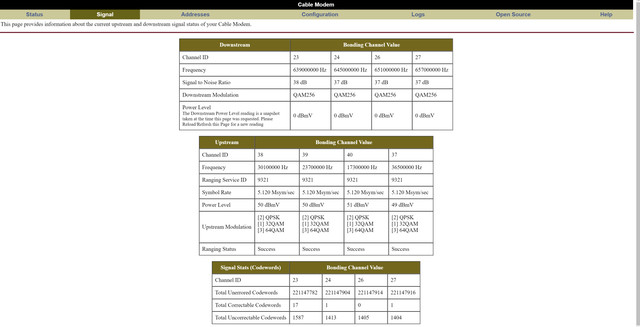
If anyone can recognize a specific issue in the logs please do enlighten me. It's like Chinese to me. 🙂


Thank you much!
 
Can you upload your image to a different site? That one isn't loading a terribly readable picture. From what I can make out, your signal strength is fine. In addition to it's age, that modem even working properly is too slow for your plan. You should have gotten a notification from Comcast that you need to replace it.
 
Your upstream power levels are too high. You have a signal problem. Check internal wiring, remove any splitters to see if any of them are bad and replace if necessary. If it doesn't help, then there is probably wiring problem between your house and TWC somewhere.
 
Your upstream power levels are too high. You have a signal problem. Check internal wiring, remove any splitters to see if any of them are bad and replace if necessary. If it doesn't help, then there is probably wiring problem between your house and TWC somewhere.

Thank you. Will try that first.
 
Your upstream power levels are too high. You have a signal problem. Check internal wiring, remove any splitters to see if any of them are bad and replace if necessary. If it doesn't help, then there is probably wiring problem between your house and TWC somewhere.

They're a bit high, but they're still inside the normal range.

Hey Xavier. If you click the pic it will load fullscreen. Comcast told me I need to swap my modem because that's what it might be causing the crashes but I thought they're just messing with me to get their modem. DOCSIS 3.0 is too slow now already?
I was eyeing this modem on Comcast's approved list: https://www.amazon.com/dp/B01DACQM9M/ref=cm_sw_su_dp

Yeah, fullsized pic wasn't loading properly for me before. DOCSIS 3.0 isn't the problem, the problem is your modem only has 4 downstream channels.
 
They're a bit high, but they're still inside the normal range.
Any time they cross 50 I'd get nervous. That's only a few dB off of capping out, and hot weather (i.e. summer) tends to degrade signal levels further.

Yeah, fullsized pic wasn't loading properly for me before. DOCSIS 3.0 isn't the problem, the problem is your modem only has 4 downstream channels.
That was my other thought as well. Though it doesn't really explain why rebooting helps. He doesn't need more than 4 channels for 100Mbps, but that's not very many channels to balance across if any one channel is congested.
 
Rebooting works as in, I get decent speed sometimes, sometimes 12mbps. I removed the splitters and I don't see any changes. 😵
 
Rebooting works as in, I get decent speed sometimes, sometimes 12mbps. I removed the splitters and I don't see any changes. 😵
As a last resort try to connect your cable modem as close to the wall as possible, i.e. right where the cable from the outside comes into the house. Hard to believe, but cables do go bad occasionally. If you want to be really really thorough, you can even get extension power cord and connect cable modem to the cable before it even comes into your house. A little extreme, but gives you 100% certainty it's not internal cabling. If upstream power levels do not improve, call cable company, it's their problem.
 
I live in a complex apartment building and we have a verizon and comcast box in our utility room with the first splitter there. I only messed around with the second splitter close to my TV setup. I'll try directly connecting the modem to the wire coming into the apartment. Thank you for all the great advice, it's much appreciated.
 
It kinda happens in the afternoon mostly 12-5PM.

How about early in the mornings? If it's only happening in the afternoons and evenings, that does sound like local congestion...

Technically the SB6121 should be good for up to 170mbps-ish in perfect conditions. Technically. 100mbps is more realistic with "good" conditions. Once an ISP decides to stop supporting a device, they can make configuration changes that effectively neuter your modem to force you to buy a new one. Given their EOL announcement specified the SB6141 is good for "up to" 150Mbps with it's 8 downstream channels and didn't mention the 6121 at all, if your goal is to get the 100mbps you're paying for then you need a new modem regardless. Having more channels available can also help (to an extent) on congested nodes as the load is spread out more.

That's not to say the splitters and cable aren't factors. But Comcast isn't going to work with you until you have a supported device anyways, so might as well start with that.
 
The customer owned SB6121 is a still supported device, but the CSRs often get confused and claim otherwise, since Comcast pulled all of their own 4x4 modems from the field.

But if you suspect that it could be the modem, go out and buy one somewhere where you can easily return it. A 16x4 channel Arris SB6183 will run about $70 from Walmart, BestBuy or Amazon. And if you suspect it's a congestion issue, do the same, as the 16 downstream channels will help on congested nodes.

My bet is that the new modem will do nothing, and that the problem is with Comcast's equipment and/or wiring. If it doesn't cure the problem, disconnect your modem, call Comcast and tell them your connection is down. They'll have to send someone out to fix the problem.
 
Back
Top