
dharmil007
Member
Hello Everyone,
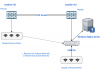
I have setup a network as defined in the below diagram.
There are 2 wireless networks:
Network 001 (Internal Network)
Network 002 (Guest Network) with Captive Portal. (vlan 10)
Both of these networks work fine at Location 001, however Guest Network does not get an IP address at Location 002. Internal Network works fine at both the location and gets the IP address from the respective Firewall.
There are smart managed L3/L2+ switches between all the devices.
All APs share the same Network SSID which is controlled by the UDM Pro in Location 001
Can somebody please assist in solving the issue?
How can I get the guest network to work at a different location than the UDM Pro?
Network Diagram:
I have setup a network as defined in the below diagram.
There are 2 wireless networks:
Network 001 (Internal Network)
Network 002 (Guest Network) with Captive Portal. (vlan 10)
Both of these networks work fine at Location 001, however Guest Network does not get an IP address at Location 002. Internal Network works fine at both the location and gets the IP address from the respective Firewall.
There are smart managed L3/L2+ switches between all the devices.
All APs share the same Network SSID which is controlled by the UDM Pro in Location 001
Can somebody please assist in solving the issue?
How can I get the guest network to work at a different location than the UDM Pro?
Network Diagram:


