• We’re currently investigating an issue related to the forum theme and styling that is impacting page layout and visual formatting. The problem has been identified, and we are actively working on a resolution. There is no impact to user data or functionality, this is strictly a front-end display issue. We’ll post an update once the fix has been deployed. Thanks for your patience while we get this sorted.

Question Speculation: RDNA3 + CDNA2 Architectures Thread

Page 257 - Seeking answers? Join the AnandTech community: where nearly half-a-million members share solutions and discuss the latest tech.
Do they? Let's focus on the second last digit:

You're not allowed to search online, tell me the Zen arch number for Ryzen 3 210.
People here kept criticizing the previous model number scheme which did encode the core gen number. We then got this frivolous mess and the criticizing somehow got less. 🤷‍♂️

Honestly stopped caring. Geizhals allows filtering by core gen so the names are completely whatever to me now.
 
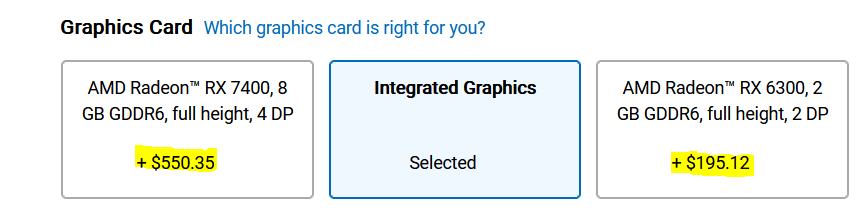
AMD launches 28 CU 43/55 watt 8gb 7400 xt


Like the PRO W7400, the RX 7400 uses a castrated version of the "Navi 33" GPU, enabling a 28CU (1792SP) GPU core, equipped with 8GB of 10.8Gbps equivalent rate GDDR6 video memory with a 128-bit bit width, and the GPU core frequency runs at 1100MHz.

The Radeon RX 7400 graphics card has a GPU power consumption cap of 43W, a TBP power consumption of 55W for the entire card , and a reference design with a single-slot length of 167mm and a thickness of 167mm.

 
From reddit on Radeon 780M = 5ms at 1080p Quality. Very expensive
That's with the "quality" setting, i.e. it's running at 720p base resolution. Most of the time, FSR4 performance (540p base) looks as good or better than FSR3.1 quality, i.e. same quality while rendering a little over half the pixels.

Chances are we're getting a performance boost at same visuals on the 780M if we replace FSR3.1 quality/balanced for FSR4 performance / ultra performance.
 
I've tried the DLL with my 6900xt, it seems to work, but there is weird artifacting in Talos Prinicple 2 (blue pixelated things on the terrain, but not on objects) and it doesn't work in any DLSS-spoof mode apart from DLAA and DLSS performance (white screen, wild flickering otherwise), it crashes my copy of Cyberpunk 2077 (probably have to update it), and seems to work fine in Cronos: New Dawn. In any case, all forms of TAA are cancer and should be provided with non-temporal alternative (Cronos is actually a surprising exception to TAA dominance, it has no (T)AA option and jitter is removed if you select it, which usually never happens in UE5 games if you disable TAA via config/ console)
 
I've tried the DLL with my 6900xt, it seems to work, but there is weird artifacting in Talos Prinicple 2 (blue pixelated things on the terrain, but not on objects) and it doesn't work in any DLSS-spoof mode apart from DLAA and DLSS performance (white screen, wild flickering otherwise), it crashes my copy of Cyberpunk 2077 (probably have to update it), and seems to work fine in Cronos: New Dawn. In any case, all forms of TAA are cancer and should be provided with non-temporal alternative (Cronos is actually a surprising exception to TAA dominance, it has no (T)AA option and jitter is removed if you select it, which usually never happens in UE5 games if you disable TAA via config/ console)
Apparently issues with Windows for RDNA 2 but Linux is better
 
Back
Top