
• We’re currently investigating an issue related to the forum theme and styling that is impacting page layout and visual formatting. The problem has been identified, and we are actively working on a resolution. There is no impact to user data or functionality, this is strictly a front-end display issue. We’ll post an update once the fix has been deployed. Thanks for your patience while we get this sorted.

I cannot get The Crew Motorfest to run no matter what I try. Any suggestions?

HeXen

Diamond Member
I did a complete reinstallation of Windows 11. Updated to all latest drivers. But still, when running the game, all I see is what's shown in the pic below. I can hear the music playing, but that's it. Does anyone have any insight into this?
For the record, Crew 2 works just fine. This is the only game that I'm having trouble with and got it on steam sale because I really want to play this game. So any help or insight is appreciated.
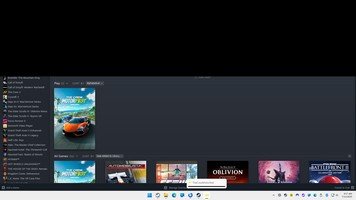

Image00001.jpg
 
Isn't The Crew the very game at the eye of the storm that is "Stop killing games"?

Ubisoft hit a kill switch on The Crew (disconnected servers mandatory to the game functioning) to get people to buy and play Crew 2.

Not sure if The Crew Motorfest and The Crew are the same game but likely the issue is the game will no longer work thanks to Ubi's kill switch.
 
Isn't The Crew the very game at the eye of the storm that is "Stop killing games"?

Ubisoft hit a kill switch on The Crew (disconnected servers mandatory to the game functioning) to get people to buy and play Crew 2.

Not sure if The Crew Motorfest and The Crew are the same game but likely the issue is the game will no longer work thanks to Ubi's kill switch.

uhm, okay. I have no clue what you're talking about.
 
Crew Motorfest is a different game from "the Crew 1". Crew 1 is the game behind the Stop Killing Games drama. Might try on the Steam forums, ubisoft forums or reddit. Could be an issue with connecting to your ubisoft account?
 
Crew Motorfest is a different game from "the Crew 1". Crew 1 is the game behind the Stop Killing Games drama. Might try on the Steam forums, ubisoft forums or reddit. Could be an issue with connecting to your ubisoft account?
I launch from ubiconnect and it appears that I'm connected. I can launch any other Ubi game from it, and it runs fine at least. AFAIK, Motorfest is the sequel to Crew 2, but apparently I'm the only one who seems to be having this issue. It looks to me to be a display issue, I can hear the sounds as I press up/down that I'm in the game menu, I just can't see anything. I can't find a single other person who mentions this same issue, although my hardware is quite common, only a few months old and it's all freshly installed.

Yesterday there was a brief moment where I could press alt and enter and would see a visual flash where the top black screen part would go away and in the left corner, I could see that I was in the ingame menu, but it was too small to read anything...so I know I'm in the game itself. It's just not displaying properly. Ubisoft support is non existent, in fact once you check the required information, the info box that allows you to say what's wrong and the submit button disappear entirely. So they purposefully gimped it.
 
You might try the Nvidia forums if you're running their card or Amd if theirs. Nvidia has had all kinds of driver problems lately. If you're not on a 5000 Nvidia card, I'd try rolling back drivers. Certainly avoid the April 15th or newer ones.
 
I launch from ubiconnect and it appears that I'm connected. I can launch any other Ubi game from it, and it runs fine at least. AFAIK, Motorfest is the sequel to Crew 2, but apparently I'm the only one who seems to be having this issue. It looks to me to be a display issue, I can hear the sounds as I press up/down that I'm in the game menu, I just can't see anything. I can't find a single other person who mentions this same issue, although my hardware is quite common, only a few months old and it's all freshly installed.

Yesterday there was a brief moment where I could press alt and enter and would see a visual flash where the top black screen part would go away and in the left corner, I could see that I was in the ingame menu, but it was too small to read anything...so I know I'm in the game itself. It's just not displaying properly. Ubisoft support is non existent, in fact once you check the required information, the info box that allows you to say what's wrong and the submit button disappear entirely. So they purposefully gimped it.
Yes finally i found someone with the same problem. Have you found a fix yet?
 
Yes finally i found someone with the same problem. Have you found a fix yet?
Yeah, I uninstalled it and play different games now. I'm still pissed at how Ubisoft literally gimped their own support so that you can't get through. I found a workaround by emailing for something else but it went ignored.
 
BROOOO... I just bought the game on sale and is having the same issue, im on a 4000 series, i launch the game, nvidia recognize the game as bein open but its not showing anywhere on my screen or taskbar but i can hear the game and its running in task manager.
 
I did a complete reinstallation of Windows 11. Updated to all latest drivers. But still, when running the game, all I see is what's shown in the pic below. I can hear the music playing, but that's it. Does anyone have any insight into this?
For the record, Crew 2 works just fine. This is the only game that I'm having trouble with and got it on steam sale because I really want to play this game. So any help or insight is appreciated.


View attachment 127021
i had the same problem with a 1366x768 monitor and that was the problem tried with a 1920x1080 tv and it worked
 
Back
Top