
VirtualLarry
No Lifer
I meant the kernel drivers. Those are still ALSA. Not the ALSA user-mode libraries.

I think that might be the AMD driver causing this issue. Have you tried using the latest proprietary driver?I meant the kernel drivers. Those are still ALSA. Not the ALSA user-mode libraries.
Maybe on the lower range, with disabled SMT. Guessing:
512 SPs, 4c/4t@3.2/3.6(3.7xfr) at $110.
On the mid and upper side 640+ SPs 4c/8t at similar frequencies and elite frequencies for $170, $200+.
I'm thinking the demand for the 8 core threadrippers is limited. Someone sinking ~$400 for a TR board will likely not skimp and future proof the build with at least 12 cores. SR and the rare PR quadcore dies are better disposed of in the low end market.

To be fair, PulseAudio did have really serious problems when it first came out. Like didn't even work half the time.
I don't think so.Yeah it sucks, but most of the major non-hobbyist distros default to it. I'm surprised anyone actually got ALSA running through Mint. Mint should default to Pulseaudio because it's "easy" and because Lennart Poettering but whatever.
Bottom line is I would only expect to see ALSA on maybe Slackware or Gentoo installs. Mint? Really?
Pulseaudio mostly works now. Mostly.
edit: wait Pulseaudio isn't even supposed to use the ALSA kernel drivers, is it?
Linux kernel 4.15 allows audio over hdmi. Vega is supported. I don't know about BR though.I've got to say, "Not well".
I built a "test mule" rig, around an AMD A8-9600 APU (Bristol Ridge). In an Asus Prime B350-E micro-ATX mobo. Which allows for overclocking of the BR APUs.
I installed Windows 10, works like a charm, everything works, great!
I installed Linux Mint 18.2 Cinnamon. No HDMI audio. No matter what I do.
I upgraded to Mint 18.3. Still no HDMI audio. Installed newest kernel, installed "daily ALSA" driver DKMS too, still no HDMI audio. Strangely, too, the analog audio doesn't show up in Linux at all either.
Booted Mint 18.3 Mate, no audio on the LiveUSB either.
Basically, it's screwed. No workable Linux audio for me. I have a monitor with speakers, I don't want to have to plug in a separate set of analog speakers every time I want to use a Linux PC.
The wierd part is, it's detected perfectly fine, and ACTS like it's actually working. Just ... no sound. Again, Windows 10 works fine. So it's gotta be Linux.
Unsure if it's the board, or the APU itself, that's incompatible with Linux.
And if Linux doesn't support BR (I can't install either the 15.2 Cats, or the AMD GPUPRO driver on Mint 18.3 either), then how is it going to support RR? I suspect that it wont.
Which is sad, these would make great Linux boxes, with an AMD APU, some DDR4, a mobo, and an SSD. Certainly cost- and performance-competitive with Intel's G4560.
Edit: This is all with the default open-source drivers in Mint 18.2 and 18.3. I was not able to get any of the proprietary drivers to install.
I did try an ATI DVI-to-HDMI adapter, off of the DVI port, and that worked in Windows 10, but not in Linux, for sound. It will do 4K though.

Linux kernel 4.15 allows audio over hdmi. Vega is supported. I don't know about BR though.
Rolling releases are latest and greatest.Very good to know. Thanks!
The prebuilt Ubuntu kernels end at 4.13, at least what's visible under the Mint Updater. Is there an easy way to get the latest and greatest easily? Since Ubuntu modifies kernels heavily I don't know if it's a good idea to build your own kernel when using Mint/Ubuntu.
Indeed, which us why I highly recommend Manjaro.Rolling releases are latest and greatest.


Depends on what yields will look like. If they have a decent amount of quad core Pinnacles, they won't just throw them away.
My guess is that, for the 2nd generation, Pinnacle Ridge is limited to 6 and 8 cores parts, with Raven Ridge making up for the 4 cores parts.
Raven Ridge will easily outsell Pinnacle Ridge with Lenovo, HP, and Dell buying Raven Ridge by the crates to put in their boring black box PCs.
Depends on what yields will look like. If they have a decent amount of quad core Pinnacles, they won't just throw them away.
There's also the question of performance delta between them. Raven is 14nm and designed for efficient operation, Pinnacle is 12nm and designed to get as much performance out of Summit as reasonably possible. Both might be used for quad cores, with Raven being used for slower SKU's.Raven Ridge with non-functional GPU probably outnumbers Pinnacle Ridge with 4 non-functioning cores.
AMD has accidentally released Ryzen 3 1200 with 8C/8T and Ryzen 5 1400, Ryzen 5 1500X, and Ryzen 5 1600/X with 8C/16T.
Consequently, we know that Summit Ridge has quite good yield and since Pinnacle Ridge is basically Summit Ridge on a refined process, we can expect the same.
Raven Ridge, on the other hand, has rather large on die-GPU that can easily be non-functional.
There's also the question of performance delta between them. Raven is 14nm and designed for efficient operation, Pinnacle is 12nm and designed to get as much performance out of Summit as reasonably possible. Both might be used for quad cores, with Raven being used for slower SKU's.
Defects that force cores to be turned off don't necessarily mean it's poor quality silicon in performance.You have to wonder how many of the best binned Pinnacle Ridge die (for higher clock) would also have four non-functioning cores.
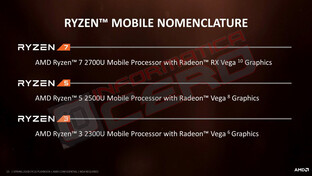
Das neue Namensschema (Bild: AMD)


Defects that force cores to be turned off don't necessarily mean it's poor quality silicon in performance.

It doesn't; just look at the dieshot.does anyone have any information on whether the RR die has the "full" 8MB L3 cache?


