
• We’re currently investigating an issue related to the forum theme and styling that is impacting page layout and visual formatting. The problem has been identified, and we are actively working on a resolution. There is no impact to user data or functionality, this is strictly a front-end display issue. We’ll post an update once the fix has been deployed. Thanks for your patience while we get this sorted.

Question AOC E16959F USB monitor not working

ay15

Junior Member
I bought this monitor for travel purposes and I haven't gotten it to work yet. It's well past the return date so I'm hoping to get it working. I am using it on a work computer so I'm limited to what I can do myself. I do want to be as prepared as I can be when I contact our IT department about it. The monitor will power on, but it doesn't show as connected to the laptop and it just shows a ready to be plugged in image. The laptop is running Windows 10. Any ideas? I have tried multiple cords.20221222_104028.jpg
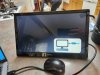
 
Have you installed the Display Link driver/software for the monitor yet? The user manual indicates this should be done before connecting the monitor.

Manual

Display Link

Note: The drivers from the CD may be old and might not support windows 10.
https://answers.microsoft.com/en-us...-windows/cb326ae9-cf49-4c3e-ba6d-9bc25d593811
 
Last edited:
Back
Top