
• We’re currently investigating an issue related to the forum theme and styling that is impacting page layout and visual formatting. The problem has been identified, and we are actively working on a resolution. There is no impact to user data or functionality, this is strictly a front-end display issue. We’ll post an update once the fix has been deployed. Thanks for your patience while we get this sorted.

Corsair H115i acting up?

deepblue08

Junior Member
Hey guys,

My pc specs:
i7 6700K (stock speeds) + Corsair H115i
Gigabyte z170x

For 9 months my rig worked absolutely fine
temps idle: 24-28C
temps while gaming SC2/Dota2/CIV: 55-60C

Yesterday I was gaming and suddenly fans spun up hard...Checked temps: 70-75C
Ran game again today for 15 mins got these temps...
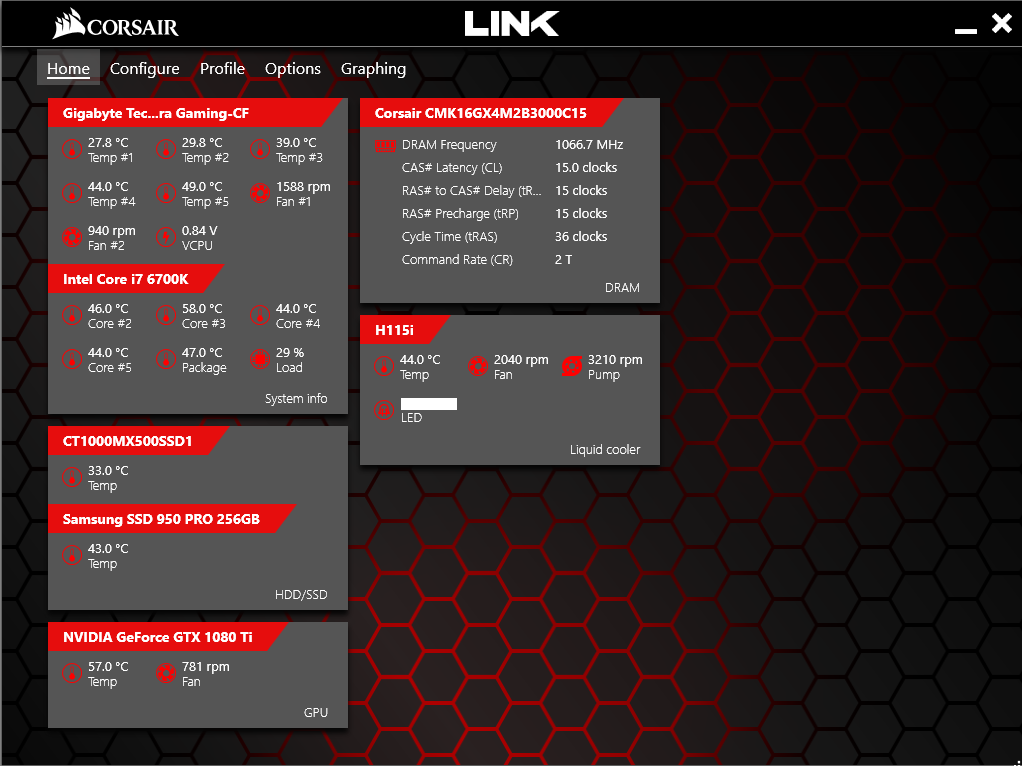
few_mins_of_gaming.png


Something is happening to this cooler, no? Needs to be replaced?

PS: I just ran Prime95 for 1 minute, and the CPU temps were 90-100C...I turned off right away...
 
It's most likely your pump isn't working properly. It probably would be good to contact their support team / RMA department.
 
It's most likely your pump isn't working properly. It probably would be good to contact their support team / RMA department.

Yeah, I am thinking you are right, because the coolant temperature always stays too close to the CPU temperature. I've seen it go past 50C
 
Make sure air bubbles aren't preventing your pump from priming too, I did a build in a Define R5 that placed the radiator in the front intake which meant it was below the pump\block. It had this issue from time to time and I eventually relocated it.

If you halt all fans can you hear the pump working at all?
 
It does sound like it's not flowing, my H100 (dual fan 120mm) listed coolant temp never gets above the high 30's C, even after running handbrake for hours on end. Interesting it shows an RPM, the priming idea is a good one.
 
Reseat the cooler, let it sit long enough for all temps to return to ambient. Hitting 100c in one minute is really fast, even if the pump isn't working. Is your radiator caked in dust? It may be a dumb question, but have you confirmed the fans on the radiator are working?
 
Back
Top