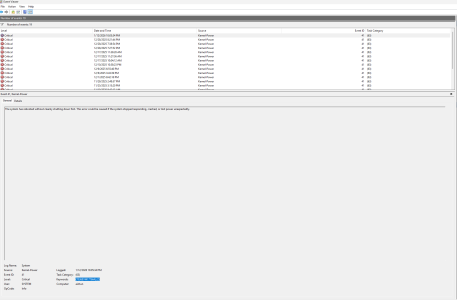
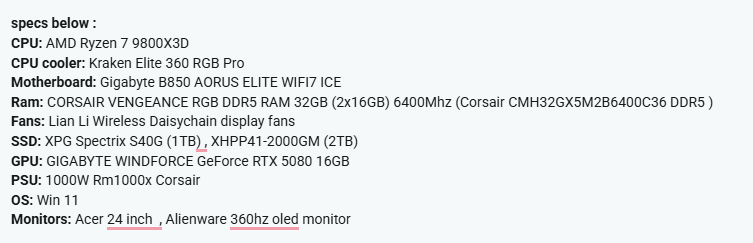
I recently built my pc (about a couple months old ) with a AMD Ryzen 7 9800x3d and GTX 5080 card and 1000W PSU.
It runs perfectly fine doing anything until it comes to certain games and I've noticed that they are usually graphic intensive games. I can play Fortnite and Valorant for hours and hours and nothing happen but when I've played games like Outlast Trials, Sons of the Forest, and Arc Raiders it completely shuts down and reboots during unexpecting moments it could be even an hour or two until it happens. Somedays it could just not happen at all which is frustrating because I would think it stopped happening and then it would just happen out of nowhere on these sorts of games. Just today I tried closing Arc Raiders by right clicking the bottom taskbar and closing it through that and it just shut off and rebooted and it was perfectly playable for about 2 hours so it's really random. To add when I first played Outlast Trials it would reboot as soon as I got in the game now it's like it never happened and I could play perfectly fine recently. ( of course I could be speaking too soon because it just happens unexpectingly) The reboots first happened when playing minecraft at max graphics (usually when the games are max graphics they tend to be worse with the reboots) and It would shutdown and reboot when it started raining in the game which was odd. Everything is brand new in the system besides one of my ssds which was taken from my old pc , I used to have two of them but I had to deal with bitlocker and one of my ssds would fail to decrypt and I had problems so i just took it out and bought a new ssd. Windows is currently installed on the working old ssd. The cpu was bought from newegg brand new, and everything else from amazon and cpu cooler from best buy. Also what I seen on the motherboard today after the reboot if I'm not mistaken was a red light on CPU and then it turned to a red light on VGA.
It runs perfectly fine doing anything until it comes to certain games and I've noticed that they are usually graphic intensive games. I can play Fortnite and Valorant for hours and hours and nothing happen but when I've played games like Outlast Trials, Sons of the Forest, and Arc Raiders it completely shuts down and reboots during unexpecting moments it could be even an hour or two until it happens. Somedays it could just not happen at all which is frustrating because I would think it stopped happening and then it would just happen out of nowhere on these sorts of games. Just today I tried closing Arc Raiders by right clicking the bottom taskbar and closing it through that and it just shut off and rebooted and it was perfectly playable for about 2 hours so it's really random. To add when I first played Outlast Trials it would reboot as soon as I got in the game now it's like it never happened and I could play perfectly fine recently. ( of course I could be speaking too soon because it just happens unexpectingly) The reboots first happened when playing minecraft at max graphics (usually when the games are max graphics they tend to be worse with the reboots) and It would shutdown and reboot when it started raining in the game which was odd. Everything is brand new in the system besides one of my ssds which was taken from my old pc , I used to have two of them but I had to deal with bitlocker and one of my ssds would fail to decrypt and I had problems so i just took it out and bought a new ssd. Windows is currently installed on the working old ssd. The cpu was bought from newegg brand new, and everything else from amazon and cpu cooler from best buy. Also what I seen on the motherboard today after the reboot if I'm not mistaken was a red light on CPU and then it turned to a red light on VGA.