
• We’re currently investigating an issue related to the forum theme and styling that is impacting page layout and visual formatting. The problem has been identified, and we are actively working on a resolution. There is no impact to user data or functionality, this is strictly a front-end display issue. We’ll post an update once the fix has been deployed. Thanks for your patience while we get this sorted.

Question incorrect count in GPU-Z for Intel UHD graphics 12th gen 64EU - ROPs/TMUs value?

blaze35

Junior Member
Recently I bought new Asus laptop core i3-1215U with intel UHD graphics 64EU (Alder lake). I see on literary every website I could find that specs for this iGPU are TMUs 32 / ROPs 16, but the GPU-Z reads only half of that number (TMU 16, ROP 8). Is the gpu-z showing the wrong values?

How can I measure max value in real-time of texture fill-rate and pixel fill-rate, maybe that is how I could confirm the right number, is there any app that can run this?

PS: I have the latest drivers from official intel site
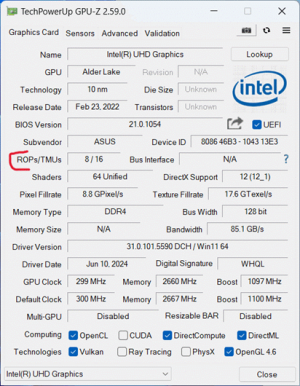
scr gpuz1.png
 
Last edited:
Recently I bought new Asus laptop core i3-1215U with intel UHD graphics 64EU (Alder lake). I see on literary every website I could find that specs for this iGPU are TMUs 32 / ROPs 16, but the GPU-Z reads only half of that number (TMU 16, ROP 8). Is the gpu-z showing the wrong values?

How can I measure max value in real-time of texture fill-rate and pixel fill-rate, maybe that is how I could confirm the right number, is there any app that can run this?

PS: I have the latest drivers from official intel site

View attachment 101732
GPU-Z doesn't measure anything. The accuracy of the information is based on knowledge of the programmers that put them in. I had to point out to them some of the information was wrong.

The only way to find accurate information is in some Intel document. I know the figures for 96EU Iris Xe but not for the cut down variants and they don't always cut them down equally.
 
GPU-Z doesn't measure anything. The accuracy of the information is based on knowledge of the programmers that put them in. I had to point out to them some of the information was wrong.

The only way to find accurate information is in some Intel document. I know the figures for 96EU Iris Xe but not for the cut down variants and they don't always cut them down equally.
what do you mean by cut down variants? can be different variants of the same model, could that be I have different variant with lower render units? I only know about 3 different core speed variants, but that is related to CPU, mine is 1100mhz but there is 1400mhz that comes with i7 processors, and i5 is somewhere between.
I don't think that logic applies to TMUs & ROPs, but honestly idk.
 
what do you mean by cut down variants? can be different variants of the same model, could that be I have different variant with lower render units? I only know about 3 different core speed variants, but that is related to CPU, mine is 1100mhz but there is 1400mhz that comes with i7 processors, and i5 is somewhere between.
I don't think that logic applies to TMUs & ROPs, but honestly idk.
Like yours is a cut down variant of the full 96EU Iris Xe.

"I don't think" means you don't know.

And yes they can cut down TMUs and ROPs in any way they like. There's no set rule. They've been that flexible since Sandy Bridge in 2011, 13 years ago!
 
what you're basically saying is there are different variants of intel GPUs of 12th generation CPUs, basically 3 different variants : UHD graphics 64EU , Iris Xe 80EU, Iris Xe 96EU.
They all have different TMUs and ROPs number. But there are different clock speeds within one variant. I assume they would not cut TMU and ROP, but clock speed is easy set and done

we can speak of different variants within the variant but try not to complicate it more as it is... 😀
but anyway , I should report it and wait for the new release to see... no one can give me straight answer
 
Back
Top