
• We’re currently investigating an issue related to the forum theme and styling that is impacting page layout and visual formatting. The problem has been identified, and we are actively working on a resolution. There is no impact to user data or functionality, this is strictly a front-end display issue. We’ll post an update once the fix has been deployed. Thanks for your patience while we get this sorted.

Setting up Windows 11/Kali Linux Dual Boot

King Friday

Junior Member
I created a bootable iso with Rufus using the Kali Installer Image. That went just fine.
I created a 100 GB partition for it in Windows Disk Management.
After booting to the USB Drive made with Rufus, I chose, "Graphical Install" and selected the Free Space I created, I then chose, "Automatically Partition the Free Space",
then, I chose, "All files in one Partition"
Then chose to write the changes to the partition.
I then chose the default, "software selection" to include xfce (default)
At that point I got an error and could not continue. The Screenshot taken then was /var/log/debian-installer_main_menu_item-failure1.png Which once I was back in Windows 11, I could not find.
Now I'm seeing a second, 977 MB EFI System Partition and this must have been created during my failed install but I can do nothing with it. (see image)

Can someone offer a bit of guidance here? I'm happy to provide more info if needed.

PS; I checked in, "System Info" prior to the install attempt and Secure Boot was, "off".
I have a Gigabyte B650 Aorus Elite AX Motherboard and could not find any, "Secure Boot" setting.
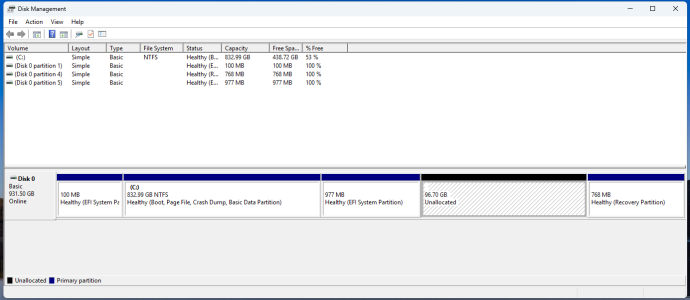
Screenshot 2026-03-27 013431.png
 
Last edited:
Try disabling fast boot in the BIOS too, I think both settings have played hell with Linux dual-boot setups (during the install) I've done before.

Having said this, I don't think your partition structure is a good idea. For example, during a Win11 update, if the installer doesn't like your recovery partition (e.g. it's not big enough), it will edit the partition structure to grow itself a new recovery partition, taking space from C drive to do it.

I'm not sure how well UEFI systems deal with two EFI boot partitions on one drive, so that's another concern I have. You can nuke that partition with a bit of command-line fu with the program called 'diskpart', though tread VERY carefully if you've never used it before because it will likely let you do anything short of nuking C drive during a live Windows session (for example, destructive diskpart commands will do so without a confirmation prompt, and 'clean' wipes a disk's partition structure completely). I would expect the string of commands to use to be something like:

diskpart
list disk
select disk 0
list partition
select partition 3 (probably)
delete partition
list partition
exit

I often have Disk Management on the screen at the same time as using diskpart so that I'm comparing the output from diskpart with the output in Disk Management to make sure I'm targetting the correct disks/partitions.

If I were you I'd dual-boot with Linux on a separate disk. Also, I don't know how new you are to trying out Linux, but if this is your first dip into the waters, I would recommend setting up a Linux virtual machine instead of dual-booting straight away. I would leave dual-booting until I'm ready to commit.
 
Maybe I'll just pop in another drive and do it that way. I would think 500 GB would be more than sufficient.
With your suggestion for diskpart, when you say, "disk 3" you are referring to the 977 MB EFI partition?
Once deleted it will merge with the, "unallocated" partition?
 
Maybe I'll just pop in another drive and do it that way. I would think 500 GB would be more than sufficient.
With your suggestion for diskpart, when you say, "disk 3" you are referring to the 977 MB EFI partition?
Once deleted it will merge with the, "unallocated" partition?
partition 3 🙂 (specifying a disk means a different physical drive connected to the system) yes, so 'list part' will give you a listing of partitions on the disk you initially selected, and I'd suggest comparing those results with what you see in Disk Management to make sure you're targetting the correct partition when you run 'select partition x'. When you delete the partition, yes, the space from that partition will merge with the space next to it (because it's not a partition, it's unused space).

Side note - I find creating partitions in diskpart unnerving because you don't tell it to target the unused space, you just fire a command off into the void (e.g. create part parttype size=100M), and it does the rest. In theory I suppose a drive can have two areas of unused space, and I assume that if one creates a partition in that scenario, diskpart will create the partition in the first unused space provided there's enough space.

I've run my main Linux desktop setup off a 128GB SSD with tonnes of room to spare.
 
Back
Top