
• We’re currently investigating an issue related to the forum theme and styling that is impacting page layout and visual formatting. The problem has been identified, and we are actively working on a resolution. There is no impact to user data or functionality, this is strictly a front-end display issue. We’ll post an update once the fix has been deployed. Thanks for your patience while we get this sorted.

What controls Turbo Core in Xeons?

Page 88 - Seeking answers? Join the AnandTech community: where nearly half-a-million members share solutions and discuss the latest tech.
I have decided to buy ASUS board and already ordered it from Computeruniverse.
The problems that I've heard of, involved older revision's compatibility issues with v4 ES chips (stepping 0). But since I own two v3 final stepping chips and the motherboard will probably be 1.04 which is the newest revision, there's no need to worry.

Another problem that concerned me was stability issues when BCLK is not 100 MHz. But it turned out that a friend who had this problem solved it simply by connecting EATX12V3 which he simply didn't notice at first 🙂


What method and ucode do you use to boost the clocks with the ASUS Z10PE-D8 WS and the 2696v3?
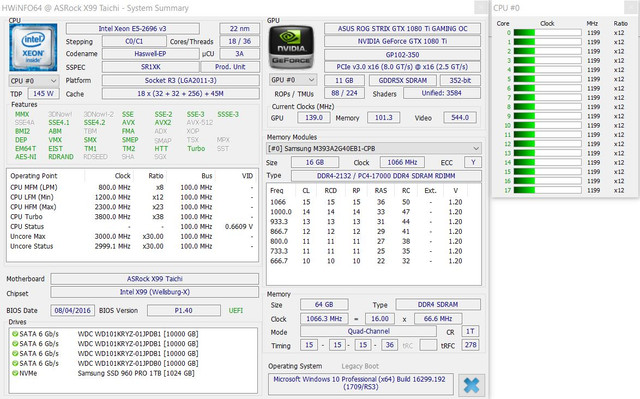
I used the taichi x99 to this date but I don't like it. (18 cores at 3.2Ghz)
The ASUS Z10PE-D8 WS is on the way (I only have 1x E5 2696v3 for now) that's why I'm asking and trying to save a lot of time because there are quite a few posts here to read...
Thank you!

https://ibb.co/eUEYZG

xeon.jpg

eUEYZG
 
Last edited:
Guys, a quick question, is it possible to control CPU related voltages from the BIOS and not from the .efi drivers with voltages set there? Say, I just load the "blank" .efi driver to allow the turbo hack without any other settings and then set the voltage and power limit in the BIOS? My motherboard is ASUS X99 Deluxe II. Right now my .efi driver includes voltage settings and, thus, completely overrides voltage set in BIOS.
 
Guys, a quick question, is it possible to control CPU related voltages from the BIOS and not from the .efi drivers with voltages set there? Say, I just load the "blank" .efi driver to allow the turbo hack without any other settings and then set the voltage and power limit in the BIOS? My motherboard is ASUS X99 Deluxe II. Right now my .efi driver includes voltage settings and, thus, completely overrides voltage set in BIOS.
Only if you have asus board
 
if you have assus board, you do not need to use efi
you just have to make a bios without micrcode and otherwise the values you set in the bios
all offset and then test to see how your processor is
 
Hey guys!

I've read through the thread the best I can, but I'm still a tad confused.

I have a Z10PE-D16 WS with a single E5-2683 V3 (at the moment, planning on a second once the price go down a little.) Can someone link me to the right bios to use to get the full turbo out of it? I'd also love to know your bios settings if that would be possible. I have no problem tinkering around with the but if someone has had success fully unlocking it I would love to see what they did to do so an attempt to recreate it.

Here's a CPU-Z validation if that would help. I flashed a bios from earlier threads a few months ago (I can't remember which one for the life of me.) https://valid.x86.fr/3tau6a

I have a freshly installed (~week old-ish) Windows 10 Pro in UEFI mode as well. I've tried adding the microcode drives but it says in the Event Viewer that "No CPU needs updating". So maybe I'm missing something in the end.

I'd really appreciate any help/advice on the subject. I can provide my BIOS settings in photos if that is required.


P.S. It would be awesome if we can search inside threads...
 
if you have assus board, you do not need to use efi
you just have to make a bios without micrcode and otherwise the values you set in the bios
all offset and then test to see how your processor is

oh really?? Amazing... will try that out!!

Stepping 1 would not start on a mobo without microcode, right?
 
Last edited:
How about spectre? Without new microcode it would be there right?

Thereby is there a smart guy who can implement the microcode in a efi driver?
Because i not only use windows or linux....
 
if you have assus board, you do not need to use efi
you just have to make a bios without micrcode and otherwise the values you set in the bios
all offset and then test to see how your processor is
I tried it yesterday but I couldn't really get it to work. My ASUS X99 Deluxe II has a stripped BIOS and I replicated my .efi driver settings in BIOS (i.e -60mv offset on vcore, -50mv offset on cache, -50mv offset on agent, SVID disabled) and then loaded the ucode 39 after booting into Windows, however, my E5-2696 V3 (OEM) did not go past the default 2.8GHz mark on all cores. Am I missing some other important BIOS settings here?

rottwag I'd really like to hear whether or not you are successful with this 🙂
 
Last edited:
I tried it yesterday but I couldn't really get it to work. My ASUS X99 Deluxe II has a stripped BIOS and I replicated my .efi driver settings in BIOS (i.e -60mv offset on vcore, -50mv offset on cache, -50mv offset on agent, SVID disabled) and then loaded the ucode 39 after booting into Windows, however, my E5-2696 V3 (OEM) did not go past the default 2.8GHz mark on all cores. Am I missing some other important BIOS settings here?

rottwag I'd really like to hear whether or not you are successful with this 🙂

no - on my side it was even worse:

#1
I disabled to load "V3 - all turbo" EFI driver from Harddisk in the BIOS - means, that Win10 should boot without having any microcode installed, as the BIOS does not have a mC inkluded.

What happened is, that Windows came up with a screen that said it is broken and if I need to repair/reinstall it...
I continued nerverthess but it crashed few seconds after showing my desktop :-(

So, i do not know how to manage to load Windows without loading an EFI driver actually?!

#2
Then, I selected to load the EFI driver as it was and started to change things in the BIOS:
I wanted to set the Offset of the Voltage - but this only works when I change the mode"fully manual" to "disabled" on the voltage section?!
The computer crashed while booting Windows - does not matter what settings....
So I changed it back to "fully manuel" to "enabled" -all settings on "auto"... and it runs as it was before....


PS: installed Xeon is a retail version, no ES or QS... Mainboard is X99-A
 
I tried it yesterday but I couldn't really get it to work. My ASUS X99 Deluxe II has a stripped BIOS and I replicated my .efi driver settings in BIOS (i.e -60mv offset on vcore, -50mv offset on cache, -50mv offset on agent, SVID disabled) and then loaded the ucode 39 after booting into Windows, however, my E5-2696 V3 (OEM) did not go past the default 2.8GHz mark on all cores. Am I missing some other important BIOS settings here?

rottwag I'd really like to hear whether or not you are successful with this 🙂
i also have the asus deluxe plate 2. with microcode 39, in big load, like handbrake, for example, and i come down to x28-29
i do not use microcode and it stays at x33, x34 when the processor is used very intensely and hard
thanks to sciff I know this too, so I went from asrock to formula to deluxe 2
i can give you some saved bios with inserts in them, but it's better to make your own bios, get micrcodes and make settings directly from bios, it goes the same way
I can also give you bios, also from Sciff
 
no - on my side it was even worse:

#1
I disabled to load "V3 - all turbo" EFI driver from Harddisk in the BIOS - means, that Win10 should boot without having any microcode installed, as the BIOS does not have a mC inkluded.

What happened is, that Windows came up with a screen that said it is broken and if I need to repair/reinstall it...
I continued nerverthess but it crashed few seconds after showing my desktop :-(

So, i do not know how to manage to load Windows without loading an EFI driver actually?!

#2
Then, I selected to load the EFI driver as it was and started to change things in the BIOS:
I wanted to set the Offset of the Voltage - but this only works when I change the mode"fully manual" to "disabled" on the voltage section?!
The computer crashed while booting Windows - does not matter what settings....
So I changed it back to "fully manuel" to "enabled" -all settings on "auto"... and it runs as it was before....


PS: installed Xeon is a retail version, no ES or QS... Mainboard is X99-A
yes, you must set to disabled , all the voltages to offset and you have
in settings, between the offset and the place where you put the voltage, must be minus
at tweaker down, you still have something with plus or minus, I get rid of what she says, but that's got to be minus
maybe that's why it does not boot
 
i also have the asus deluxe plate 2. with microcode 39, in big load, like handbrake, for example, and i come down to x28-29
i do not use microcode and it stays at x33, x34 when the processor is used very intensely and hard
thanks to sciff I know this too, so I went from asrock to formula to deluxe 2
i can give you some saved bios with inserts in them, but it's better to make your own bios, get micrcodes and make settings directly from bios, it goes the same way
I can also give you bios, also from Sciff

Thanks for the info! Are there any certain drawbacks or dangers in running a CPU without a microcode? I'll give it a try when I get back home. Oh and if you could give me the BIOS from Sciff, it would be great!
 
yea, I would love to have a BIOS with injected microcode for my Asus X99-A as well 🙂

On saturday, I will plug in a E5 2696 v3....

PS: My QFQ E5 2695 V3 buy was canceled... now I got this as replacement...
 
Last edited:
I do not know so good to tell you about stepp 1, I am amateur who wanted to go harder and his xeon E5 2696 v3 OEM
What I know, I say
Unfortunately, I only have bios for asus deluxe 2 and asrock I know something
it's harder to inject efi into bios at asus motherboards
 
Thanks for the info! Are there any certain drawbacks or dangers in running a CPU without a microcode? I'll give it a try when I get back home. Oh and if you could give me the BIOS from Sciff, it would be great!
if you give me a mail address, in private, I can send you the settings pictures
 
How does a [SR1XK] E5-2696v3 (non-ES) would match to a [QGN7] one which is ES or QS but both has the same specs in CPU-Z except the ES mark behind the name in a dual socket asus z10pe d8 motherboard?
 
Back
Top