• We’re currently investigating an issue related to the forum theme and styling that is impacting page layout and visual formatting. The problem has been identified, and we are actively working on a resolution. There is no impact to user data or functionality, this is strictly a front-end display issue. We’ll post an update once the fix has been deployed. Thanks for your patience while we get this sorted.

Question i9-10900K + Corsair H150 RGB 360mm AIO — 100°C under load, thermal throttling active, can't find a solution.

usyk

Junior Member
System
CPU: Intel Core i9-10900K — 10 Cores, LGA1200
Motherboard: MSI MPG Z490 Carbon EK X
AIO: Corsair H150 RGB — 360mm
RAM: HyperX Fury RGB 32GB (2×16GB) DDR4 3000MHz
GPU: ASUS GTX 1060 Dual OC 3GB
PSU: Corsair HX1000 — 1000W 80+ Platinum
Storage: Samsung 970 EVO Plus 500GB + Seagate Barracuda 2TBCase: MSI MPG Sekira 500G Mid Tower

Problem
Under load, all cores reach 95–100°C with thermal throttling active. Radiator fans are running at full speed but temperatures don't drop.
At low power draw (15–25W), temps stay around 45–50°C. As power demand increases, temperatures rise disproportionately — hitting 100°C even at 60–70W. Calculated thermal resistance is ~2.68°C/W, whereas the expected value for a 360mm AIO is around 0.30–0.40°C/W.

What I've tried
Two technicians looked at it, neither reached a concrete conclusion. I started digging into it myself after that.
I noticed the pump header was set to DC mode in BIOS — switching it to PWM dropped the CPU from 99°C to 56°C. I then found the pump cable was connected to the wrong header and fixed that too. I set power limits to Intel stock values, enabled C1E, reapplied thermal paste multiple times using Arctic MX series, ran an air bubble test by tilting the case in different directions, and went through every relevant BIOS setting I could find.
Each step helped a little, but the problem never fully resolved.

Current Readings
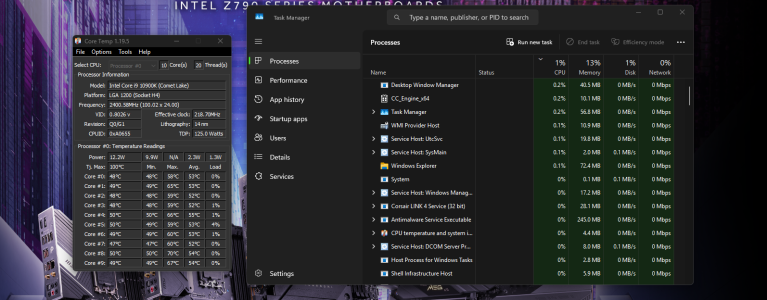
Idle (12–15W): 45–50°C — expected 35–42°C
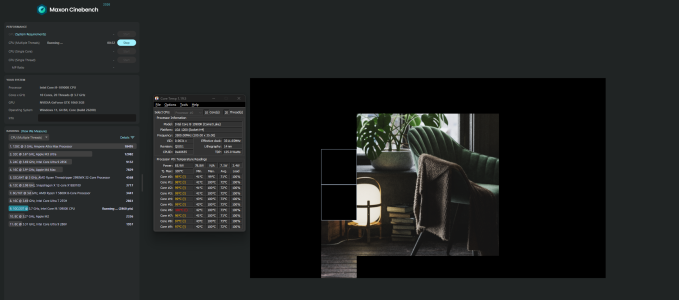
Cinebench R23 (85.9W): 97–100°C, 100% load — expected 65–80°C
Cinebench R23 score: ~2,860 pts (due to throttling) — expected ~7,500 pts
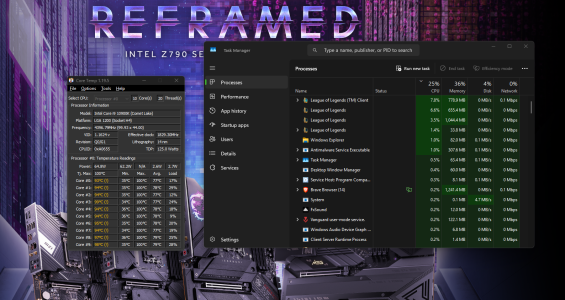
Gaming, 25% CPU load (65W): 93–99°C — expected 55–70°C

My Question
I've listed everything I've tried — is there anything I might be missing? If anyone has faced something similar or has a different hypothesis, I'd really appreciate the input.​
 

Attachments

  • EK-1, Gaming.png
    EK-1, Gaming.png
    1 MB · Views: 3
  • EK-2, Idle.png
    EK-2, Idle.png
    470.2 KB · Views: 2
  • EK-3, CINEBENCH Results.png
    EK-3, CINEBENCH Results.png
    534.4 KB · Views: 2
@daveybrat
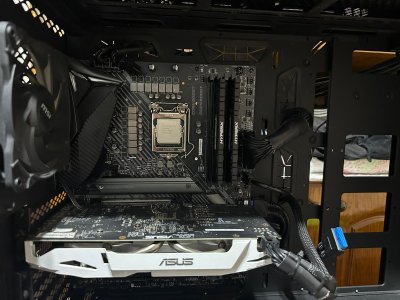
That's really useful to hear from someone who's worked on the same generation. The PA120 SE is already on my list but I'm a bit worried about fitment — attaching a photo of my current setup. The RAM sits pretty close to the socket and the VRM heatsinks on this Z490 board are quite large. Do you think a dual tower like the PA120 SE would clear everything, or should I be looking at something more compact?PC CASE.jpeg
 
Agreed. AIO pump is failing/has failed. Time for a new cooler.
Pump is spinning at 3000+ RPM so it's not fully dead, but exhaust air off the radiator stays at ambient during load and temps drop slowly after short stress tests rather than snapping back immediately — points to a flow problem in the loop rather than a dead pump. Either way the result is the same. Is there any way to self-repair something like this, or is replacement the only realistic option?
 
Realistically, replacement is the way.
Agreed, time for a new cooler. Preferably air rather than liquid — complexity and longevity are both concerns after this experience. Case limit is 170mm CPU cooler height, socket is LGA1200, and the board has fairly large VRM heatsinks with high-profile RAM sitting close to the socket. Any long-lasting air cooler recommendations that would fit and handle a 10900K?
 
@daveybrat
That's really useful to hear from someone who's worked on the same generation. The PA120 SE is already on my list but I'm a bit worried about fitment — attaching a photo of my current setup. The RAM sits pretty close to the socket and the VRM heatsinks on this Z490 board are quite large. Do you think a dual tower like the PA120 SE would clear everything, or should I be looking at something more compact?View attachment 139832

Sure, go with the Thermalright Royal Knight cooler instead. It's designed to allow for the ram and VRM clearance you'll need on that setup and is still a beast of a cooler.

 
Pump is spinning at 3000+ RPM so it's not fully dead, but exhaust air off the radiator stays at ambient during load and temps drop slowly after short stress tests rather than snapping back immediately — points to a flow problem in the loop rather than a dead pump. Either way the result is the same.
Perhaps corrosion product or other dirt has clogged the channels of the coldplate.

Is there any way to self-repair something like this, or is replacement the only realistic option?
That's the irony:
– Custom loops are designed such that they can be opened, rinsed, the coldplate brushed, the loop refilled — yet the only thing of these one ever needs to do (if a custom loop was assembled correctly) is to add a bit of water once every few years.
– AIO loops, in contrast, are designed such that nothing of that can be done — yet they tend to be manufactured such that everything of that should be done after a couple of years or so.

That said, take a look if there is a way to open the cooler+pump assembly, in order to get to the coldplate for cleaning. Filling the AIO back up after that may only be possible though by cutting one of the hoses and adding a reservoir (as in a custom loop, can be a small reservoir, ideally it would be placed in front of the pump's inlet but for this you would need to know the flow direction). — I am speaking theoretically as I don't know if people have ever done this with AIO liquid coolers.
 
– Custom loops are designed such that they can be opened, rinsed, the coldplate brushed, the loop refilled — yet the only thing of these one ever needs to do (if a custom loop was assembled correctly) is to add a bit of water once every few years

Not applicable if you run hard petg hard pipes and use a distro plate, as it becomes essentially a sealed unit as petg hard pipe are not pours like regular tubing is. You get very little to almost no coolant loss in a hard piped system. This is why i am on hard pipes now, but they are significantly more difficult to setup then a regular Custom with tubing.

Filling the AIO back up after that may only be possible though by cutting one of the hoses and adding a reservoir (as in a custom loop, can be a small reservoir, ideally it would be placed in front of the pump's inlet but for this you would need to know the flow direction). — I am speaking theoretically as I don't know if people have ever done this with AIO liquid coolers.

Actually on some AIO's you can do it by going though the cpu block if the bolt attachments are on the underside. But it only applies on some of them and not all of them as you stated. If you can screw off the cold plate from the underside, you can fill it. However filling it with proper coolant is a can of worms on its own, as you will need a premix, and one with anticorrosion properties.

But i agree with you on AIO's as they are very difficult to be seviced, and also agree with you that possible corrosion damage has occured since most of them are made with a copper heat plate and a aluminum radiator.

I would like to know what fans he is running though, and how much air is being pushed though the fins. You can do that with a tissue or toliet paper test... if it is gently flowing, you may need more air though the rads, as you probably also have a thin radiator which isn't very optimized for low static pressure. If the paper is flowing in almost a 90 degree, then yes, your cold plate and flow maybe clogged.
 
Back
Top