

King Friday
Junior Member
I created a bootable iso with Rufus using the Kali Installer Image. That went just fine.
I created a 100 GB partition for it in Windows Disk Management.
After booting to the USB Drive made with Rufus, I chose, "Graphical Install" and selected the Free Space I created, I then chose, "Automatically Partition the Free Space",
then, I chose, "All files in one Partition"
Then chose to write the changes to the partition.
I then chose the default, "software selection" to include xfce (default)
At that point I got an error and could not continue. The Screenshot taken then was /var/log/debian-installer_main_menu_item-failure1.png Which once I was back in Windows 11, I could not find.
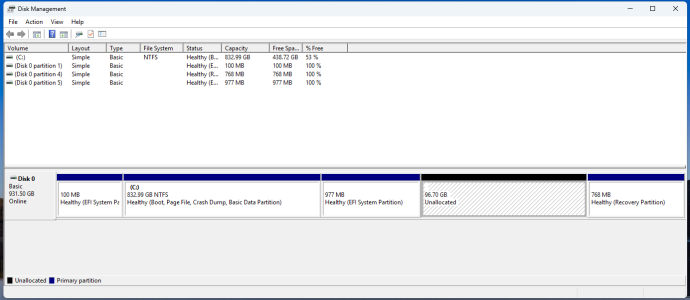
Now I'm seeing a second, 977 MB EFI System Partition and this must have been created during my failed install but I can do nothing with it. (see image)
Can someone offer a bit of guidance here? I'm happy to provide more info if needed.
PS; I checked in, "System Info" prior to the install attempt and Secure Boot was, "off".
I have a Gigabyte B650 Aorus Elite AX Motherboard and could not find any, "Secure Boot" setting.
I created a 100 GB partition for it in Windows Disk Management.
After booting to the USB Drive made with Rufus, I chose, "Graphical Install" and selected the Free Space I created, I then chose, "Automatically Partition the Free Space",
then, I chose, "All files in one Partition"
Then chose to write the changes to the partition.
I then chose the default, "software selection" to include xfce (default)
At that point I got an error and could not continue. The Screenshot taken then was /var/log/debian-installer_main_menu_item-failure1.png Which once I was back in Windows 11, I could not find.
Now I'm seeing a second, 977 MB EFI System Partition and this must have been created during my failed install but I can do nothing with it. (see image)
Can someone offer a bit of guidance here? I'm happy to provide more info if needed.
PS; I checked in, "System Info" prior to the install attempt and Secure Boot was, "off".
I have a Gigabyte B650 Aorus Elite AX Motherboard and could not find any, "Secure Boot" setting.
Last edited:


